Install and set up EDGEhack
EDGEhack is an extension for VS Code, not a game mod. You install it in VS Code, and it makes game mods. Allow about ten minutes, most of it downloads.
| On this page | |
|---|---|
| What you need | To run EDGEhack |
| What each feature needs | Frameworks and REDnode, in one table |
| Install EDGEhack | Three ways, by editor |
| Where it shows | Its icon and three views |
| Try it | Open Overheat. Nothing is changed |
| Updating, Uninstalling |
What you need
| You need | Notes |
|---|---|
| Windows, and VS Code 1.90 or later | Or an editor built on it, such as VSCodium or Cursor. The EDGEkit app comes with EDGEhack built in |
| Cyberpunk 2077, version 2.5 | EDGEhack reads the quickhacks from your own game |
| REDcode 0.10.8 or later | EDGE’s editor for game files. EDGEhack reads the game through it and saves into its project. REDcode fetches REDbridge and .NET 10, the parts that read the game’s files, the first time it starts: see Install and set up REDcode |
| A project open in REDcode | The folder your mod’s files go into. No project yet? Run REDcode: New Project from the command palette (Ctrl+Shift+P): see Make a new project. Without a project you can still read quickhacks and work on the Desk |
What each feature needs
A framework is a mod that other mods need. The mods EDGEhack makes need some in the game, and two features need REDnode, EDGE’s in-game runtime.
| To do this | You need in the game |
|---|---|
| Play any mod made with EDGEhack | TweakXL, and RED4ext, which TweakXL runs on |
| See a name, description or icon of your own | ArchiveXL |
| Use a new quickhack on enemies | redscript. Each mod with a new quickhack includes one small script. Without redscript the new quickhack does not show on enemies |
| Run a quickhack’s script | REDnode 0.61.1 or later |
| Try Live, and the Console line that gives V a quickhack | REDnode 0.62.4 or later |
| Have REDcode swap icons into the running game | REDnode with its MCP server switched on: see Pack and Play |
| Draw icons with Generate | An OpenAI API key of your own. Each picture is billed to your OpenAI account. Uploading your own pictures needs no key |
| Ask REDagent for a quickhack in the game | Coming. It needs a REDnode and a REDagent that are not released yet |
All of these REDnode versions are released, so the current REDnode covers them.
The quick way to get the frameworks: in EDGEdeck, Get the frameworks… fetches RED4ext, TweakXL, ArchiveXL and redscript (and two more that many mods need) in one go. Then close the game and deploy. See Getting the frameworks.
Sharing your mod? Whoever installs it needs the same rows of this table as you do: TweakXL and RED4ext always, ArchiveXL for your texts and icons, redscript for a new quickhack, REDnode for a script. They don’t need EDGEhack, REDcode or VS Code. See Sharing your mod for what to zip.
Install EDGEhack
Pick the row for your editor.
| Your editor | How |
|---|---|
| The EDGEkit app | Nothing to do: EDGEhack is built in, and it updates itself |
| VSCodium, Cursor, or another editor that uses Open VSX | Open the Extensions view (Ctrl+Shift+X), search for EDGEhack and press Install. REDcode is installed with it. Here it updates itself too |
| VS Code | From the download, below. EDGEhack is not on the VS Code Marketplace yet: see Status |
In VS Code:
- Install REDcode from the Extensions view first, if you don’t have it.
- Download
EDGEhack-<version>-nexus.zipfrom EDGEhack’s Nexus Mods page, where it is listed as Quickhack Editor. Or downloadedgehack-<version>.vsixfrom the releases page and skip step 3. - Unzip it. Inside is a
.vsixfile, which is the extension. - In VS Code, open the Extensions view (
Ctrl+Shift+X). - Click the
...at the top of that view and choose Install from VSIX…. - Pick the
.vsixfile.
Don’t install the download with Vortex or EDGEdeck. It is not a game mod.
You should see a new icon in the activity bar, the strip of icons down the left edge of VS Code: a chip with a bolt. If it doesn’t appear, run Developer: Reload Window from the command palette.
Then open your project in REDcode: File › Open Folder… on the project’s folder.
Where it shows
Click EDGEhack’s icon in the activity bar. Its side bar has three views:
| View | What it lists |
|---|---|
| Desk | Quickhacks you’re working on outside a project. Below them, a Project group with the quickhacks in the open project |
| Library | Quickhacks you keep in the EDGE Library, in folders you made |
| Quickhacks | The game’s own quickhacks. People holds the ones V uses on enemies, in the game’s four categories (Control Hack, Covert Hack, Damage Hack, Ultimate Hack), each quickhack with its icon and its number of tiers. Devices and Vehicles hold the rest, which are read-only for now |
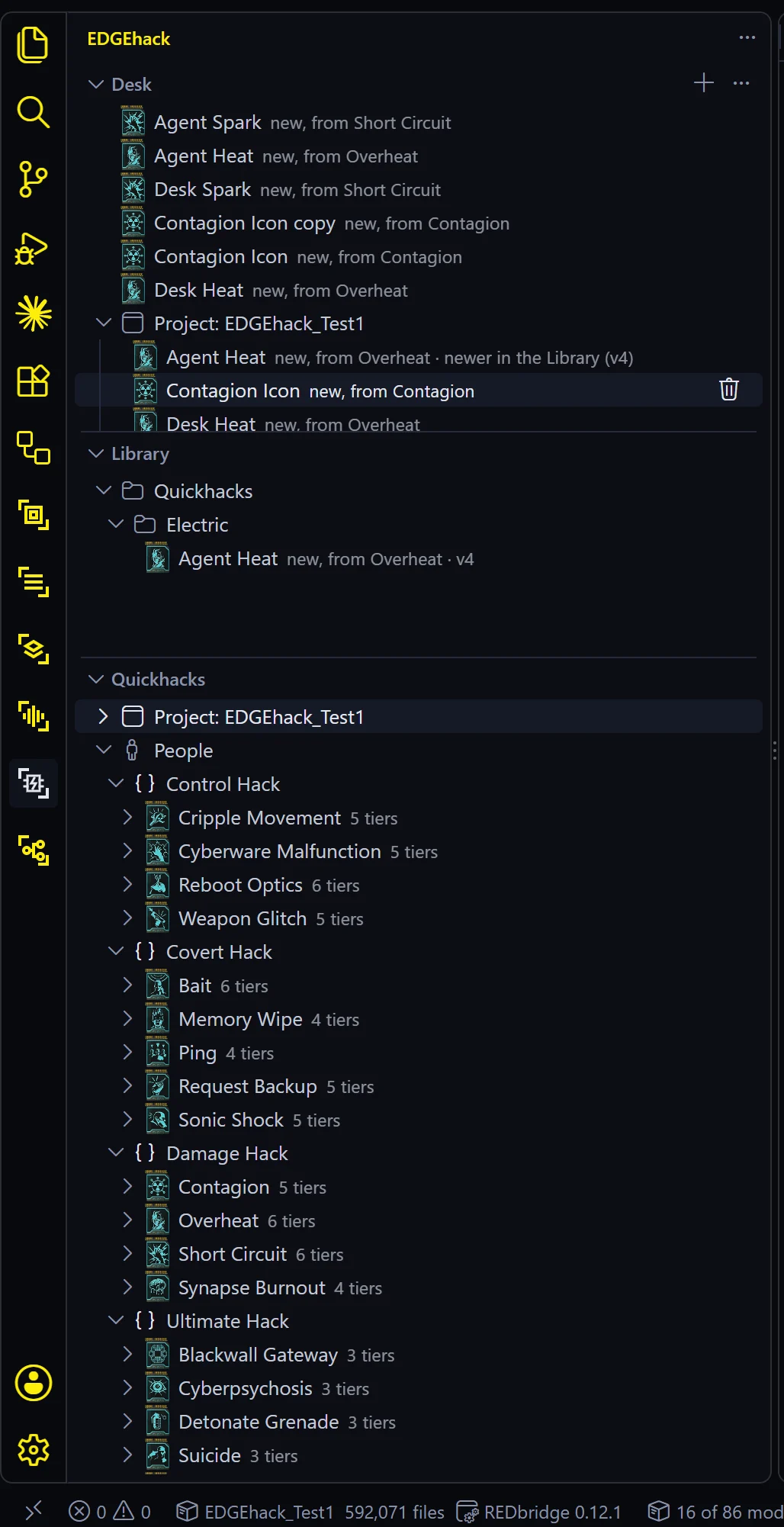
The first time the Quickhacks view opens, EDGEhack reads the game’s database, which takes about 15 seconds. After that everything opens at once until VS Code restarts.
Two buttons sit in the Quickhacks view’s title bar. Filter narrows the list by words, such as overheat or control. Refresh reads the game again: use it after a game patch, or after you install or remove a mod that changes quickhacks.
Try it
- Click EDGEhack’s icon in the activity bar.
- In Quickhacks, open People, then Damage Hack.
- Click Overheat.
| What you should see | |
|---|---|
| A new tab | Overheat’s icon and name, “Quickhack · Damage Hack · 6 tiers”, and the words “The game’s own quickhack” |
| A row of tier buttons | Common to Legendary++. Click one to see that tier |
| For the tier you picked | Its name, icons, RAM, upload time, damage, duration and effects in plain words |
| Two buttons | Edit… and Clone and Modify… |
This page is read-only. Nothing is written anywhere until you press Edit… or Clone and Modify…. Those are the next two pages: Change a game quickhack and Your first quickhack.
If the view stays empty, see Troubleshooting.
Updating
| Installed from | Updates |
|---|---|
| The EDGEkit app, or Open VSX | By itself |
A .vsix in VS Code |
Not by itself. Download the new version and install it the same way, over the old one. Your quickhacks are not touched |
The current version is on the Overview. The version you have is on EDGEhack’s entry in the Extensions view.
Uninstalling
In the Extensions view, find EDGEhack, click the gear and choose Uninstall. What stays behind:
| What | Where | To remove it |
|---|---|---|
| Quickhacks in your projects, and their mod files | In each project | They are yours. A mod you already installed keeps working without EDGEhack |
| Quickhacks on the Desk | %LOCALAPPDATA%\EDGEhack\desk |
Delete the EDGEhack folder there |
| Quickhacks in the EDGE Library | Your Library folder | They are yours, and other EDGE tools share the folder |
| Your OpenAI key | VS Code’s secret storage | Run EDGEhack: Clear the OpenAI Key… before you uninstall |
| The connection to Claude Code, if you made one | Claude Code’s settings | Run claude mcp remove --scope user edgehack in a terminal |