Try Live and Pack and Play
There are two ways to see your quickhack in the game. Both are buttons at the top of the quickhack’s page.
| Try Live | Pack and Play | |
|---|---|---|
| What it does | Sends the quickhack’s changes into the running game. Nothing is installed | Packs your project into a mod and installs it. It is REDcode’s Pack and Play, run from EDGEhack’s page |
| The game | Running, with a save loaded | Closed. Start it afterwards |
| Needs | REDnode in the game | REDcode. With EDGEdeck, the mod is installed through it |
| Shows | Numbers, effects and feature lines, within seconds | Everything, from the next game start |
| Doesn’t show | Names, descriptions, icons of your own, scripts | |
| To go back | Stop, or close the game | Uninstall the mod |
Use Pack and Play to put a quickhack in the game, and Try Live to tune its numbers while you play.
| On this page | |
|---|---|
| Try Live | The steps, and what the buttons do |
| What shows live | And what waits for Pack and Play |
| Pack and Play | With the game closed, and with it running |
| Try it |
Try Live
- Start the game with REDnode, and load a save.
- On the quickhack’s page, click a tier’s name at the top of the Numbers table to select it.
- Press Try Live.
- The first time in a game session, the game shows REDnode’s Editor request window, asking whether EDGEhack may change the game. Press Allow. If you don’t see the window, press
F10.
| What you should see | |
|---|---|
| On the page | “Trying it live”, with the number of changes in the game. The button now reads Try Again, and Stop is beside it |
| In the game, for a new quickhack | The selected tier in V’s backpack. Slot it into the cyberdeck |
| In the game, for a changed game quickhack | The new numbers the next time V scans someone |
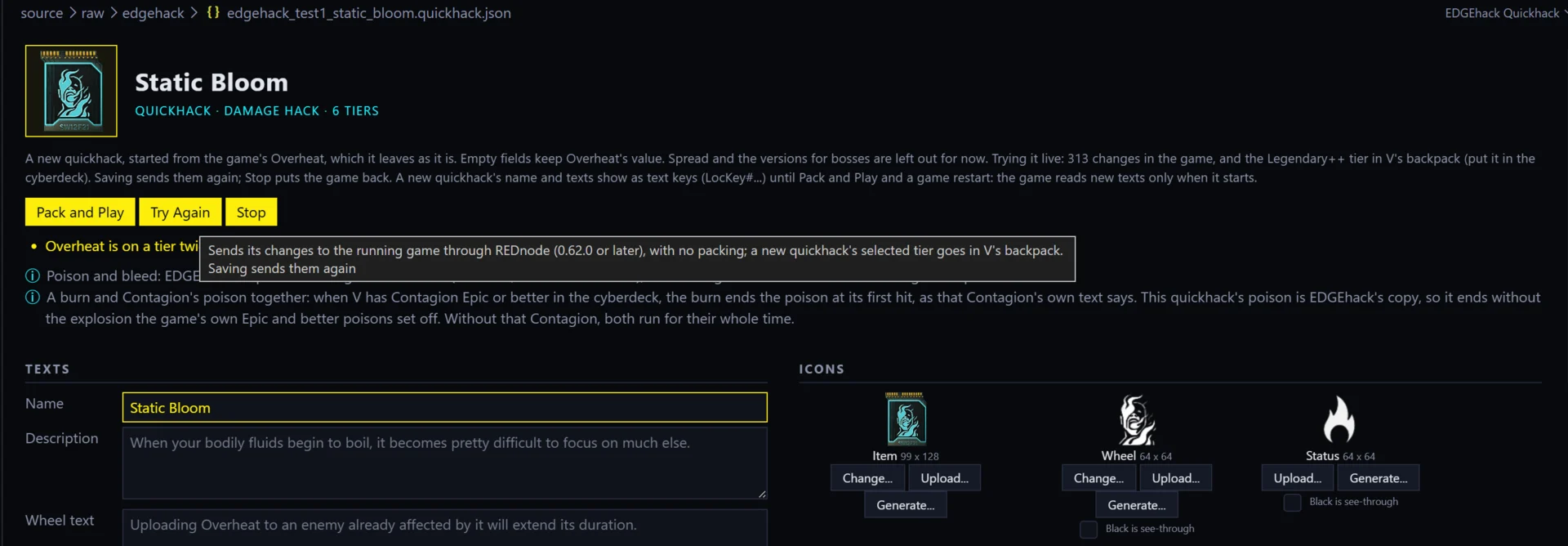
While it is on:
| Do this | And this happens |
|---|---|
| Save the page | The changes are sent again. So: change a number, save, scan again |
| Press Try Again | The same, without a save. For a new quickhack it also gives V the selected tier again |
| Press Stop | Every number EDGEhack changed goes back, and V’s quickhack list is refreshed |
| Close the quickhack’s tab, or the game | The same as Stop |
A changed number shows on the next scan, not on a quickhack that is already uploading.
If you press Deny in the Editor request window, EDGEhack can’t ask again until the game restarts.
A new quickhack that doesn’t show on enemies. A new quickhack needs one small redscript file in the game before enemies can be targeted with it. That file comes with any mod made with EDGEhack. So install a mod with a new quickhack once, with Pack and Play, before you try new quickhacks live. Changes to the game’s own quickhacks don’t need it.
After Stop. The game can’t delete a quickhack that was made while it runs, so a new quickhack tried live stays in the game’s memory until the game closes, and V may still carry the item. What a save made in that state does later has not been tested. To be safe, don’t keep a save made while trying a new quickhack that isn’t installed as a mod.
Is it safe? Try Live never writes into the game folder. It changes the running game’s memory through a connection REDnode offers to editors on the same PC, its editor channel. Nothing outside your PC can use it, and each editor must be allowed by you in the game first. REDnode’s side is described under Settings and controls in REDnode’s section.
What shows live
| Change | Live? |
|---|---|
| RAM, upload, damage, duration | Yes, on the next scan |
| Added effects | Yes. An effect built with Make New has not been tested live yet |
| Feature lines | Yes |
| A new quickhack | Yes. It is made in the running game and given to V |
| Cooldown | Not tested live yet |
| Get it: vendors and crafting | Not tested live yet. Use the Console line to get the quickhack |
| Names and descriptions | No. The game reads texts only when it starts. Until Pack and Play and a restart, a new quickhack shows a text key (LocKey#...) as its name, and a changed one shows the texts it was last packed with |
| Icons of your own | No. They come with the mod, at Pack and Play |
| Scripts | No. They come with the mod, at Pack and Play |
The page reminds you of the limits that apply to your quickhack when you press Try Live.
Pack and Play
Pack and Play saves the page, packs the whole project and installs the mod. The mod holds every quickhack in the project, with their names, icons and scripts.
The simple way: with the game closed.
- If you are trying the quickhack live, press Stop. Close the game.
- Press Pack and Play on the page.
- Start the game and load a save.
You should see the page’s status read “Packed.”, and a message from REDcode that the mod is installed. With EDGEdeck, the mod appears in its list, named after your project. Without EDGEdeck, REDcode copies the files into the game folder itself. More in Install in REDcode’s section.
With the game running. What REDcode does depends on what the mod contains:
| Your mod has | What Pack and Play does |
|---|---|
| Only changed numbers and effects | It installs the mod for the next start. If EDGEdeck is in use, EDGEdeck asks you to quit the game first |
| Texts or icons of your own, and REDnode’s MCP server is switched on | It swaps the mod’s archive, the file that holds your texts and icons, into the running game through REDnode. If the mod’s other files (numbers, effects, scripts) are new or changed, it says they were not carried and offers Install for Next Start |
| Texts or icons of your own, and no REDnode | It installs the mod for the next start, as in the first row |
A swap alone is rarely enough for a quickhack. The numbers and effects of a quickhack live in TweakXL files, which the game reads only when it starts, and names need a restart too. So when Pack and Play offers Install for Next Start, choose it and restart the game. The swap itself is explained in Pack and Play: into the running game.
To take the mod out again, use Uninstall in the ... menu of REDcode’s Project view: see Uninstall.
Sharing the mod. See Sharing your mod for what to zip, and What each feature needs for what your players need installed.
Try it
You need a quickhack of your own that is already installed, such as Static Bloom after Your first quickhack.
- With the game running and a save loaded, open the quickhack’s page, select Rare and press Try Live. Allow EDGEhack in the game.
- Slot the quickhack, scan an enemy and note its RAM cost.
- On the page, lower the Rare tier’s RAM by 1 and save.
- Scan the enemy again.
- Press Stop.
| What you should see | |
|---|---|
| After step 1 | “Trying it live” on the page |
| After step 4 | A RAM cost 1 lower than in step 2 |
| After step 5 | “Stopped”, with a count of records put back, and the old cost on the next scan |