Voices for quests and mods
Two features voice many lines at once. Both use ElevenLabs with your own key, so read Cost, privacy and your key first.
| On this page | |
|---|---|
| Voice a quest | Voice Lines, for a quest written in EDGEquest |
| The Voice Lines panel | Voices, takes, and fixing one line |
| How a line is spoken | Delivery tags and the model |
| EDGEwave Voice for REDnode | Mods that speak, in the running game |
| For mod authors | Calling EDGEwave Voice from your mod |
Voice a quest
EDGEquest is EDGE’s quest maker: you write a quest’s story, with its dialogue, and it builds the quest. Voice Lines takes that quest’s lines and gives each one a spoken take.
In the game, the lines are still subtitles only. Voice Lines makes each take as a WAV file in your project, where you can hear and edit it. Putting those takes into the game as real dialogue needs the
.wemformat, which is not there yet (Voice lines). Voice your quest now and the takes are ready when it is.
| You need | |
|---|---|
| EDGEquest, with a quest that has lines | The lines come from its Storyboard |
| An ElevenLabs key | Your key. Every line voiced spends credits, and each of V’s lines is voiced twice, once for each of V’s voices |
To start:
- In EDGEquest, open your quest on its Storyboard and click a beat’s card.
- On the beat’s page, press Voice all N lines beside a scene’s name. To voice a single line, press Generate on that line.
- EDGEwave opens a tab, Voice Lines:
<quest>, with those lines.
| What you should see | |
|---|---|
| The tab | The scene’s lines, each with its speaker and text, all marked no take. V’s lines have two takes each, F and M |
To come back to a quest you voiced before, run EDGEwave: Voice Lines… from the command palette (Ctrl+Shift+P).
The Voice Lines panel
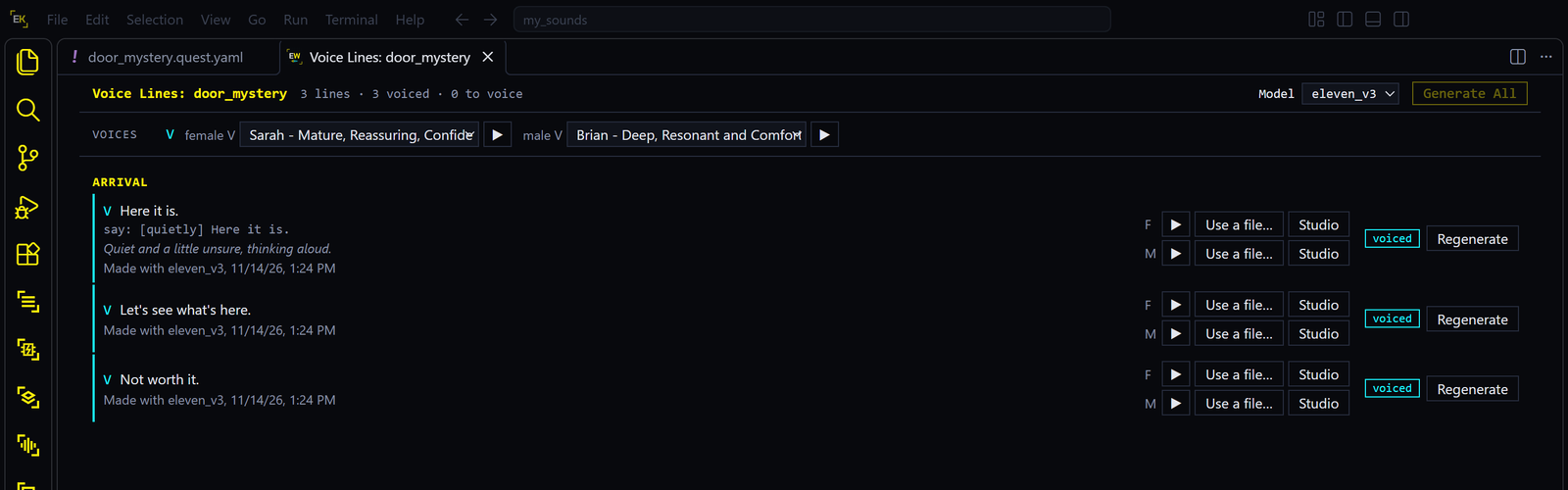
- Pick the voices. At the top, choose a voice for each speaker from your ElevenLabs account, and two for V: female V and male V. ▶ plays a voice’s sample.
- Press Generate All. It voices every line that has no take yet, or whose words changed since its take. Stop ends the run. What was made is kept.
- Listen. ▶ on a take plays it.
- Fix what you don’t like, line by line.
| On a line | Does |
|---|---|
| Generate, Regenerate | Voices just this line, again |
| Previous | Swaps back to the take before, and again to the new one |
| Use a file… | Uses a recording of your own for this take: a WAV, MP3, OGG or FLAC file |
| Studio | Opens the take in EDGEwave’s editor, to trim it or add effects. Press Render WAV there, and the panel plays the edited take |
| What you should see | |
|---|---|
| While it runs | The header counts the voiced lines, and the line being made says voicing… |
| When a line is done | It says voiced, with what made it and when, such as Made with eleven_v3 |
| In EDGEquest | The Storyboard shows the same lines as voiced. Change a line’s text there, and both show it as changed |
Your voice choices are remembered for the quest. The takes are in your project, in source\raw\edgewave\voice\<quest>: one WAV per take, named the way the game names voice files, and voice.json, the record of what was made from what.
How a line is spoken
By default each line is spoken as its subtitle reads. To direct it, write the line again in its Say box in EDGEquest, with delivery tags in square brackets:
[whispers] Here it is. [sighs] Not what I expected.
| Model, in the panel’s header | With tags |
|---|---|
eleven_v3, the default |
Follows them: the line is whispered, with a sigh. The tag words are not read out |
Any other, such as eleven_multilingual_v2 |
Speaks plainly. The tags are taken out first |
The model Voice Lines starts with is the setting edgewave.voiceLines.model.
EDGEwave Voice for REDnode
EDGEwave Voice is a small game mod, a REDnode package. It lets other REDnode mods speak lines of text aloud while you play, in a voice you set up. It is for mods that write their words as they go, such as an AI companion. On its own it does nothing you can hear, except a test line.
| Needs | REDnode 0.36 or later in the game, and an ElevenLabs key |
| Costs | Each new line spends your ElevenLabs credits. Every line is kept on disk, so the same words in the same voice play again at once and for free |
| Sounds | On the game’s Dialogue volume slider. It pauses in menus. There is no lip movement, and subtitles are up to the mod that speaks |
Set it up:
- In VS Code, run EDGEwave: Voices for REDnode… from the command palette. Pick the ElevenLabs voices that mods may use. Voices EDGEwave made come first.
- Start the game and load a save. Press F10 and open EDGEwave Voice from REDnode’s launcher.
- Paste your ElevenLabs key into the window and press Enter. The Copy the Key button in step 1’s message puts the key on the clipboard for this.
- Under Try a line, press Speak.
| What you should see | |
|---|---|
| After step 1 | A message naming the voices by short names, such as judy. In the game folder, red4ext\plugins\REDnode\apps\edgewave-voice, with a voices.json that lists them. The first is the default |
| After step 2 | The window says “No key yet” |
| After step 3 | “Key set”, and the box empties |
| After step 4 | The line, spoken, a second or two later. Press Speak again: it plays at once, “from the cache” |
Good to know:
- The key is typed in the game because a REDnode package can read only its own secrets. REDnode keeps it encrypted with your Windows account. EDGEwave can’t hand it over for you.
- Once a key is set, the window stays closed when the game starts. To open it, load a save and switch EDGEwave Voice off and on in the launcher.
- To rename a voice or change the default, edit
voices.json. Running Voices for REDnode… again keeps the names you have. - Without VS Code, the package is also a download of its own,
edgewave-voice-<version>.zip, on EDGEwave’s releases page and as an optional file on Nexus Mods. Unzip it into the game folder. The zip has novoices.json: the command in step 1 makes it. - A voice belongs to one ElevenLabs account. A mod you share with other players needs their own key and voices.
- A cloned game voice is a real voice actor’s. Voice clones applies here too, and more so if the result is shared.
The cached lines are in the package’s .cache folder, up to 200 MB. The oldest go first.
For mod authors
A REDnode mod reaches EDGEwave Voice as a service:
import { service } from 'rednode';

const voice = await service.connect('edgewave-voice');
const line = await voice.speak('Choom, you look like hell.', 'judy');
voice.$on('ended', (e) => { if (e.id === line.id) nextLine(); });
| Function | Does |
|---|---|
speak(text, voice?, options?) |
Makes the line, or finds it in the cache, and plays it |
prepare(text, voice?, options?) |
Makes the line without playing it, so the next one starts sooner |
stop(id?, fadeOut?) |
Stops one line, or all |
voices(), status() |
The names set up, and whether it can speak |
A line can be up to 2,500 characters. Speak a conversation line by line: each line starts sooner. Add "requires": { "edgewave-voice": ">=0.1" } to your mod’s manifest, so REDnode says when it is missing. The full reference, with the options and the errors, is on EDGEwave’s docs: EDGEwave Voice for REDnode.