EDGEwave and assistants
An AI assistant can do some of EDGEwave’s work for you. You ask in plain words, such as “find the music cues for the Dex meeting”, and the assistant searches the game’s sound events. It can also turn a WAV file into a new sound event in your project, and voice a quest’s lines.
It works because EDGEwave comes with an MCP server: a small program that offers these abilities to an assistant as tools. MCP is the standard way AI assistants use tools. The assistant on this page is Claude Code, Anthropic’s assistant that runs in a terminal or inside VS Code.
The assistant gets five tools, not the whole studio. Editing, mixing and Add to Project’s other routes are done with the buttons.
| On this page | |
|---|---|
| What you can ask | Examples, and what comes back |
| Connect Claude Code | Three steps |
| The ElevenLabs key | Only for voices, and where it ends up |
| Other assistants | VS Code’s own agents, other clients |
| The tools | All five |
| Good to know | Credits, the event list, what it can write |
What you can ask
| Ask | What comes back |
|---|---|
| “Search the game’s sound events for an airdrop landing.” | Matching events, such as sa_airdrop_package_land, with their lengths and tags |
| “Which music cues does the quest q001 have for meeting Dex?” | The mus_q001_... cues that start and stop that music |
“Which sounds does my project C:\Mods\my_quest already have?” |
The project’s own named sounds first, then the game’s |
“Make C:\Sounds\knock.wav a sound my quest can play, in my project C:\Mods\my_quest. Call it knock.” |
A new event, edgewave_knock, written into the project. Then pack and install, as in A new sound for this project |
| “Which ElevenLabs voices do I have that sound like an older man?” | Voices from your account. Needs your key |
| “Voice the lines of my quest with EDGEwave.” | With EDGEquest connected too: a take for each line, as in Voice a quest. Needs your key, and spends credits |
Connect Claude Code
The server comes with the EDGEwave extension. You need Claude Code installed. EDGEchat, the EDGE plugin for Claude Code, does not include EDGEwave, so you connect it here.
- In VS Code, press
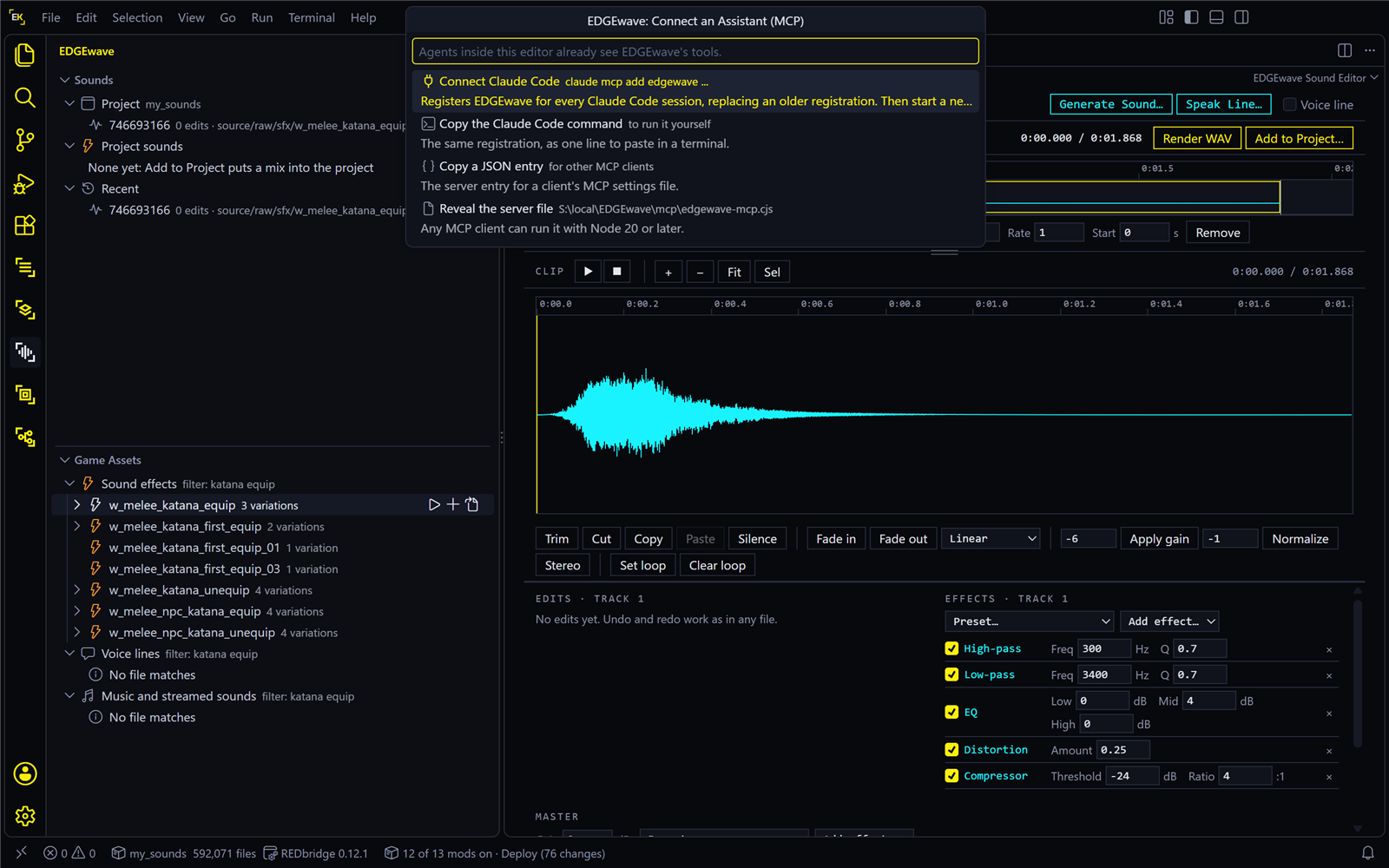
Ctrl+Shift+Pand run EDGEwave: Connect an Assistant (MCP)…. - Choose Connect Claude Code. If you have set an ElevenLabs key, it asks “Give the assistant your ElevenLabs key too?”. See The ElevenLabs key before you answer.
- Start a new Claude Code session. A session that was already open doesn’t see the new tools.
| What you should see | |
|---|---|
| After step 2 | “EDGEwave is connected to Claude Code. Start a new Claude Code session and ask it to find a sound event, or to voice a quest’s lines.” |
| After step 3 | Ask “Which EDGEwave tools do you have?”: Claude lists sound_events, sound_custom, voice_lines, voice_status and voice_voices. Or run claude mcp list in a terminal: edgewave shows as connected |
This connects EDGEwave for every Claude Code session on your PC, whichever folder you start it in, and replaces an older connection. You don’t need to install anything else: if you don’t have Node.js 20 or later, the server runs with the copy built into VS Code. If EDGEwave can’t find Claude Code’s claude command, it offers to copy the line for you to run yourself.
All the EDGE servers, side by side: Connect Claude Code.
The ElevenLabs key
Only the voice tools need a key: voice_lines and voice_voices. Searching sound events and making a new event work without one.
Claude Code runs the server outside VS Code, so the server can’t read the key VS Code keeps in its secret storage. When you connect, EDGEwave asks:
| Answer | What happens |
|---|---|
| Yes, include my ElevenLabs key | The key is handed to Claude Code, which stores it in its own settings file, in plain text. The assistant can then voice lines and list voices, and that spends your credits |
| No | The key stays in VS Code. Sound events and new sounds still work. You can connect again later and say yes |
To take the key back out, connect again and answer No: the new connection replaces the old one.
Other assistants
| Assistant | How |
|---|---|
| Agents inside VS Code (1.101 or later) | Nothing to do: they see EDGEwave’s tools by themselves, with your key from VS Code’s secret storage |
| Another MCP client | In the same list, choose Copy a JSON entry and paste it into the client’s MCP settings. Copy the Claude Code command gives the one-line command instead, with <key> where your key goes |
| By hand | Reveal the server file shows it: %LOCALAPPDATA%\EDGEwave\mcp\edgewave-mcp.cjs. Any MCP client can run it with Node.js 20 or later. It reads the key from the environment variable ELEVENLABS_API_KEY |
The server needs no VS Code to run. It reads EDGEwave’s settings from VS Code’s settings file.
The tools
| Tool | Does | Writes? |
|---|---|---|
sound_events |
Searches the game’s sound events by words, tags or hash. It can keep to music cues, or to events marked for quests. With a project’s folder, the project’s own sounds come first | No |
sound_custom |
Makes a WAV file into a new event, edgewave_<name>, in a project: a sound effect with a position, or music that plays the same everywhere |
Yes, into the project |
voice_lines |
Voices a quest’s lines through ElevenLabs and saves the takes and their record | Yes, into the project. Spends credits |
voice_status |
Says which lines of a quest are voiced, changed or missing | No |
voice_voices |
Lists the voices in your ElevenLabs account, with a search | No |
Good to know
voice_linesdoes not ask first. An assistant that decides to voice lines does so, and each line spends ElevenLabs credits. If you want a say, tell the assistant to ask you before it voices anything, or don’t give it the key.- The event list comes from VS Code.
sound_eventsreads a list EDGEwave builds from your game. If the assistant says EDGEwave has not read the game’s sound events yet, open VS Code with a REDcode project, click EDGEwave’s icon and unfold Sound effects in Game Assets once. Then ask again. - A new event needs packing.
sound_customonly writes into the project. The game plays the sound after you switch on the REDmod setting, Pack and Install, and start the game with Run Game. - An open Voice Lines tab follows along. While the assistant voices lines, each row in the tab flashes as its take changes.
- Privacy. The server makes no network calls of its own. Only the voice tools reach ElevenLabs, as on Voice tools. What the assistant itself sends to its maker is that assistant’s business.