Baking a scene into the world
Baking turns a scene into a mod. Until you bake, your objects are previews: only you see them, only while EDGEbuilder runs, and V walks through them. After a bake they are part of Night City: solid, there without EDGEbuilder, and there for anyone who installs your mod.
How it works, in one line: the Bake tab writes your scene into a REDcode project as a sector, the game’s own file format for one piece of the world. REDcode packs the project into a mod, and the game loads it at its next start.
| On this page | |
|---|---|
| What you need to bake | |
| From scene to world | The four steps, and the checks |
| What a bake keeps, and what is solid | |
| People in a baked scene | Spawning them from a script |
| The Solid switch | Whether a mesh stops V |
| Seen from | How far away an object is drawn |
| After a bake | Changing, removing and renaming |
| Sharing a baked scene | Giving your mod to others |
| Try it | Solid, Seen from and taking a bake out |
| Bakes in the Library | One bake for several projects |
New to baking? Your first scene walks through one bake, step by step.
What you need to bake
| You need | Why | Where |
|---|---|---|
| REDcode, with a project open in VS Code | The bake is written into the project, and REDcode packs it into a mod. Any project will do, even a new empty one | REDcode projects |
| REDbridge 0.12.1 or later; 0.16.0 or later for a scene that removes the game’s doors | It writes the baked files | EDGEdeck’s Get REDbridge or Update REDbridge |
| EDGEdeck | REDcode’s Pack and Install puts the mod in the game through it | Install EDGEdeck |
| ArchiveXL, deployed in the game | A framework mod. The game reads a baked scene through it, so without it the bake never shows. Everyone who plays your mod needs it too | EDGEdeck’s Get the frameworks, or Nexus Mods |
EDGEbuilder does not check for ArchiveXL. If a bake doesn’t show in the game, look there first.
From scene to world
- Open the project in REDcode, and the scene in EDGEbuilder.
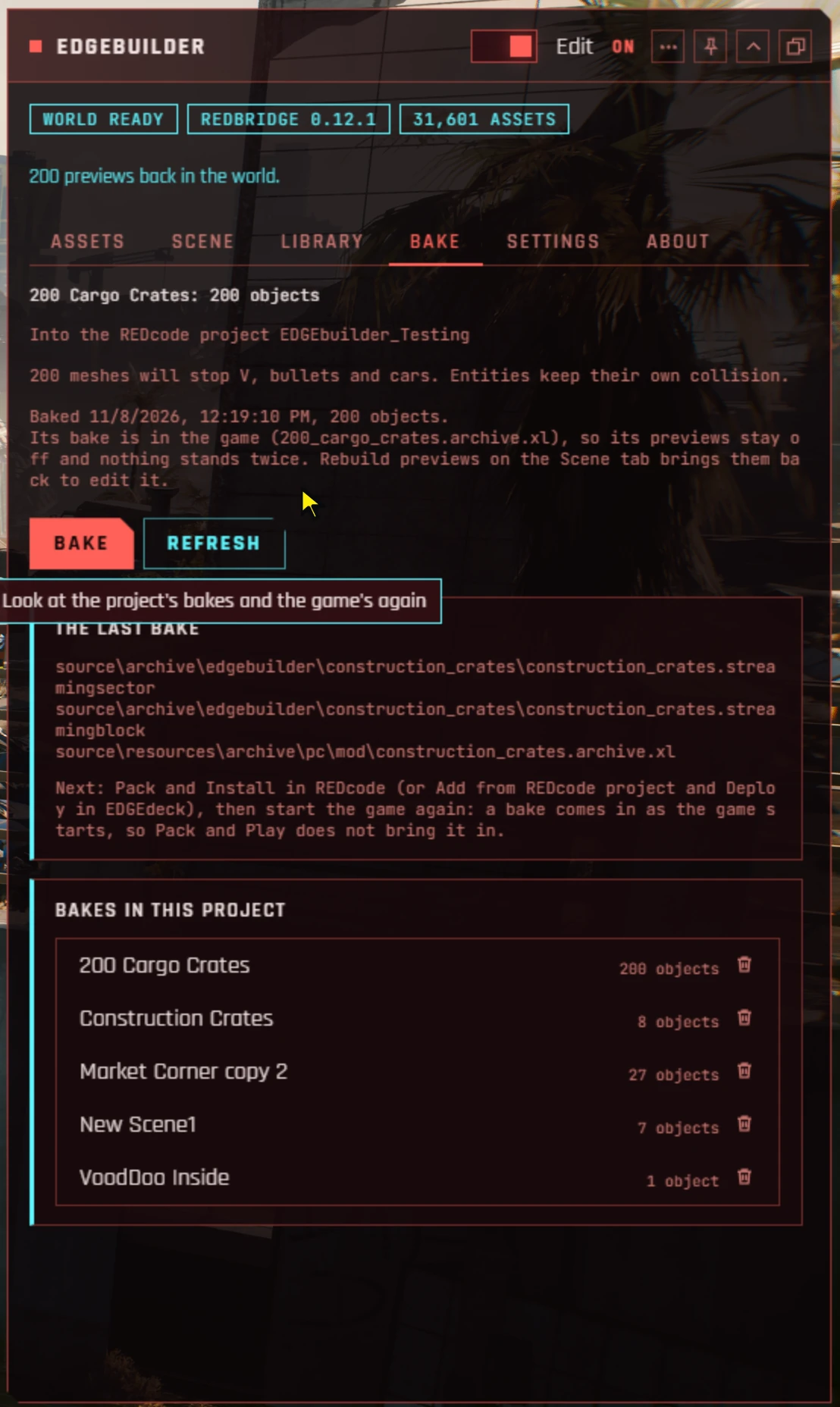
- On the Bake tab, read the checks, then press Bake. The The last bake panel lists the files it wrote.
- Quit the game. In REDcode, press Pack and Install (the rocket button). It packs the project and installs it through EDGEdeck.
- Start the game and load a save.
What you should see: the objects in the world, with EDGEbuilder closed. On the Bake tab, the scene’s line says Its bake is in the game.
Two things to know:
- A bake comes in only at a game start. Loading a save without restarting won’t show it, and neither will REDcode’s Pack and Play.
- The first Pack and Install adds your project to EDGEdeck as a mod, with the version
dev. Later ones refresh that same mod. There is nothing to add or tick in EDGEdeck yourself.
The checks
The Bake tab lists what it found before you bake. A red check stops the bake. The others are for you to read.
| The check says | Kind | What to do |
|---|---|---|
| No scene is open | Stops the bake | Open a scene, or make one, on the Library tab |
| The scene has nothing to bake yet | Stops the bake | Drop a mesh or an entity. People alone can’t be baked |
| No REDcode project is open | Stops the bake | Open or make a project in REDcode, then press Refresh |
| No REDcode project can be seen: REDcode’s REDnode package is not in the game | Stops the bake | See Troubleshooting |
| REDbridge is not ready | Stops the bake | Look at the pills at the top of the panel |
| Anyone playing this bake needs: and a mod’s name | Warning | The scene uses that mod’s files. Tell the people you share it with |
| A mesh has no collision data, so V walks through it | Warning | See The Solid switch |
| This project has a bake with this name, from another scene | Warning | Baking replaces it. Rename your scene to keep both |
| REDbridge writes no solid meshes, or does not pass Seen from on | Warning | Your REDbridge is older than 0.12.1. Update it |
| An NPC is never baked | Note | People are left out of the bake. They still show while EDGEbuilder runs |
| So many meshes will stop V, bullets and cars | Note | Those meshes will be solid |
| So many meshes are set not solid | Note | V will walk through those. See The Solid switch |
Packing as a REDmod
REDcode’s setting redcode.pack.redmod is off by default, and most people can skip this. If you switched it on, the bake installs as a REDmod, and the game must start with -modded. EDGEdeck’s Run game does that for you.
What a bake keeps, and what is solid
Collision data is the invisible shape the game uses to stop V, bullets and cars. An object with it is solid. Many of the game’s models have none, because the game never needed them to be solid.
| Object | In the baked world |
|---|---|
An entity that is solid in the game, such as crate_red.ent |
Solid, and keeps its look |
| A mesh, Solid on | Stops V, bullets, melee and cars, stays put and keeps its look. If you scaled it, the solid shape is scaled too. The mesh must have collision data |
| A mesh, Solid off | Only drawn: V, bullets and cars pass through |
| A mesh from a mod | Bakes too, and the Bake tab names the mod. If a player doesn’t have that mod, the game doesn’t crash: that object is missing, and the rest are there |
| A person (NPC) | Left out. The Bake tab says which |
You can bake several scenes into one project. They can be far apart, indoors or in Dogtown.
People in a baked scene
A bake never holds people. In your finished mod, someone has to spawn them, and that is a script: an EDGEquest quest or any REDnode package. REDnode reads EDGEbuilder’s scene files itself, so the people stand where you placed them, facing the way you turned them, in the look you picked. EDGEbuilder isn’t needed for that, but REDnode is, for everyone who plays the mod.
How to lay out your scenes:
| Your people | Scenes | Why |
|---|---|---|
| Belong with the place, there whenever it is (a bar and its staff) | One scene with the props and the people | You place people against the props and see them together while you build. Bake it, and the script spawns only its people |
| Come and go on their own events (a meeting at night, guards after a quest step) | A scene of props, and a scene for each group of people | Each group is loaded and removed on its own event. Bake the props scene |
| Several setups of the same place (before and after a fight) | One props scene, and a people scene for each setup | The place stays baked; the script swaps the people |
The props come in from the bake when V gets near, as the game’s own do. The people come in when the script loads them.
Spawning only the people of a scene. REDnode’s world.load spawns every object in a scene, so loading a baked scene as it is would put each prop in the world twice. Read the scene and keep only its people:
const scene = JSON.parse(await fs.readFile(file, 'utf8'));
await world.load({ ...scene, objects: scene.objects.filter((o) => o.kind === 'npc') }, { name: 'alley_people', wait: false });
// later, on another event
await world.unload('alley_people');
wait: false lets the people load even when V is far away: they come in once V gets near. world.unload removes only what that load spawned, so the baked props stay. A people-only scene needs no filter: world.load it as it is. An option to do the filtering for you is asked of REDnode. The world has more on world.load.
For now the people stand friendly and idle. Walking, sitting and talking are for later tools.
Doors you removed
A scene that removes some of the game’s own doors bakes them too: the bake writes instructions for ArchiveXL to leave those doors out of the world, with the stand-in copies the game shows of them from afar. A scene can do nothing but remove things; its bake is then one small .archive.xl file and no objects. The Bake tab and the list of bakes say both numbers, 0 added, 2 removed. See Removing the game’s doors, with a walkthrough.
The Solid switch
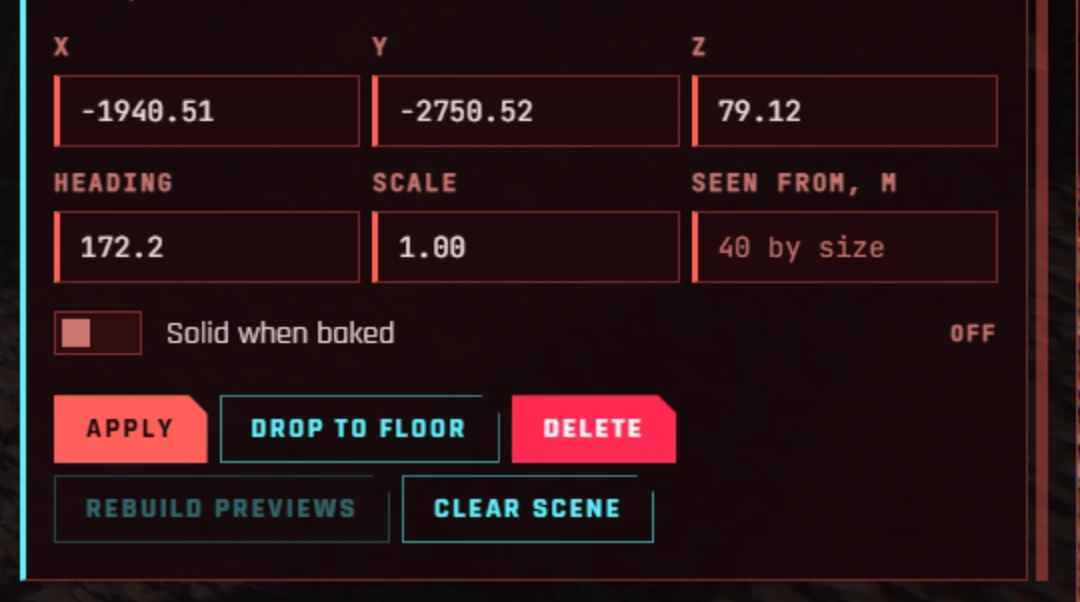
Select one mesh, several or a group on the Scene tab and switch Solid when baked on or off. New meshes start solid. Previews in the world are never solid, so you can walk through them while you build.
About 4 in 10 crate-sized meshes have no collision data, and those can’t be made solid. The Scene tab says so under the switch: No collision data, so this mesh can’t be solid. The Bake tab names them too. Use an entity that is already solid instead, such as crate_red.ent.
With several meshes selected, the line under the switch counts them, for example 3 of 4 solid. The switch acts on all of them.
Seen from
Seen from is an object’s draw distance: how many metres away the game still shows it, once baked. Set it in the Seen from, m field on the Scene tab, for one object, several or a group.
| The field | Means |
|---|---|
| Empty | The game goes by the object’s size: 40 m for small things, up to 400 m for big ones. The field’s grey hint shows the distance, for example 40 by size |
| A number, from 5 to 2000 | The object is drawn from that many metres away. A crate set to 120 shows from 120 m |
| mixed as the hint | Several objects are selected, with different distances |
Type the metres and press Enter. To go back to the distance by size, empty the field and press Enter.
A larger distance makes the game draw more at once, which can lower the frame rate in a busy scene. Previews are not affected: they are seen from any distance.
On frame rate: in the tests, 200 baked crates in one place made no measurable difference to the frame rate. As previews, the same 200 cost about 6 frames per second.
After a bake
A baked object can’t be moved in the game. You move its preview, then bake again. While a scene’s bake is in the game, EDGEbuilder places no previews for it, so that no object is there twice. The Bake tab says Its bake is in the game.
To change a baked scene:
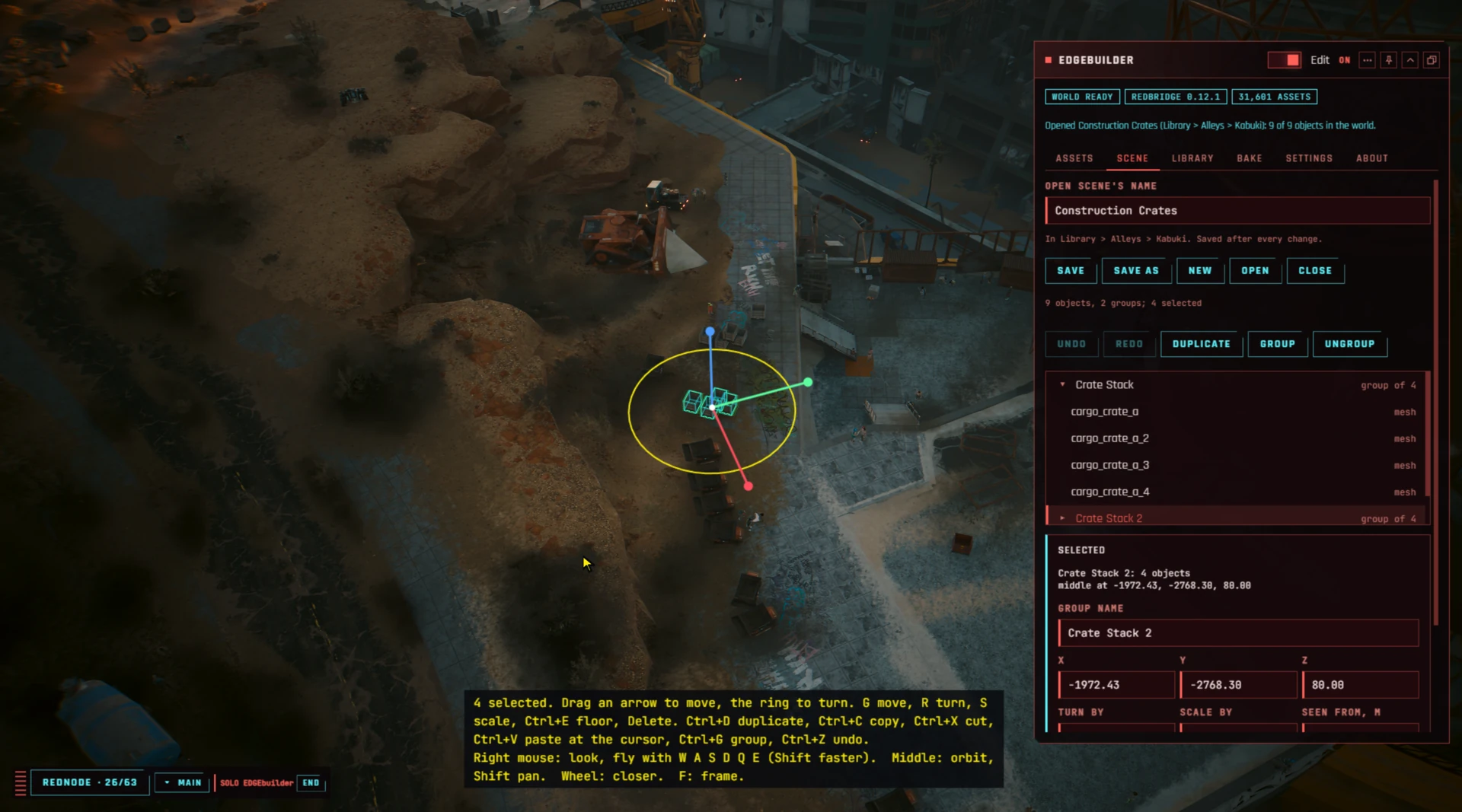
- On the Scene tab, press Rebuild previews. The previews come back. Each object is now there twice, the baked one and its preview, so it may flicker. Drag a preview away and the baked object stays behind.
- Make your changes. The Bake tab says The scene changed since: bake again to bring it in.
- Press Bake, quit, Pack and Install in REDcode, and start the game. The objects are in their new places, with no copies at the old ones.
| To | Do | Good to know |
|---|---|---|
| Take a bake out | On the Bake tab, press the trash icon beside it in Bakes in this project, then Yes. Then Pack and Install, and restart | Removing a bake does not harm your save games. The scene stays. If it is still open, its objects show as previews again: press Close on the Scene tab to take those away |
| Rename a baked scene | Rename it, bake again, and take the old bake out | A bake is named after its scene, so the existing bake keeps the old name. If you leave both, the objects are in the world twice. EDGEbuilder warns you before it renames |
Sharing a baked scene
A baked scene is part of your REDcode project’s mod, so you share it the way you share any REDcode mod:
- In REDcode, press Pack.
- Zip what is inside the project’s
packedfolder. - Give people the zip. They install it with a mod manager such as EDGEdeck or Vortex.
REDcode’s Sharing your mod has the steps in full.
Tell the people who install it what the mod needs:
| They need | Why |
|---|---|
| ArchiveXL, and RED4ext | The game reads a baked scene through ArchiveXL |
| Every mod named under Anyone playing this bake needs: | Your scene uses those mods’ models. Without the mod, those objects are missing |
They don’t need EDGEbuilder, REDnode or REDbridge.
Try it: Solid, Seen from and taking a bake out
- Open a scene with a few meshes, and the REDcode project to bake into.
- On the Scene tab, select one mesh and switch Solid when baked off.
- Select a group, type
80in Seen from, m and press Enter. The message says the objects will be seen from 80 m once baked. - Open the Bake tab and read the checks. One says a mesh is set not solid. Press Bake.
- Quit, Pack and Install in REDcode, start the game: V walks through the one mesh and bumps into the rest.
- To take the bake out again: on the Bake tab, press the trash icon beside it in Bakes in this project, then Yes. Quit, Pack and Install again, and start. The objects are gone from the world, and the scene is still in the Library.
Bakes in the Library
Say you have built three street corners and want them in two different mods. Bake them once into the EDGE Library, then include that bake in each project.
A Library bake lives in the Library beside your scenes, instead of in one project.
- Making one needs no REDcode project.
- It can hold several scenes. Each scene is baked as its own piece of the world, so the game loads it only when V is near it.
- It has a version. Each time the bake changes, its version goes up by one, so a project can tell that its copy is out of date.
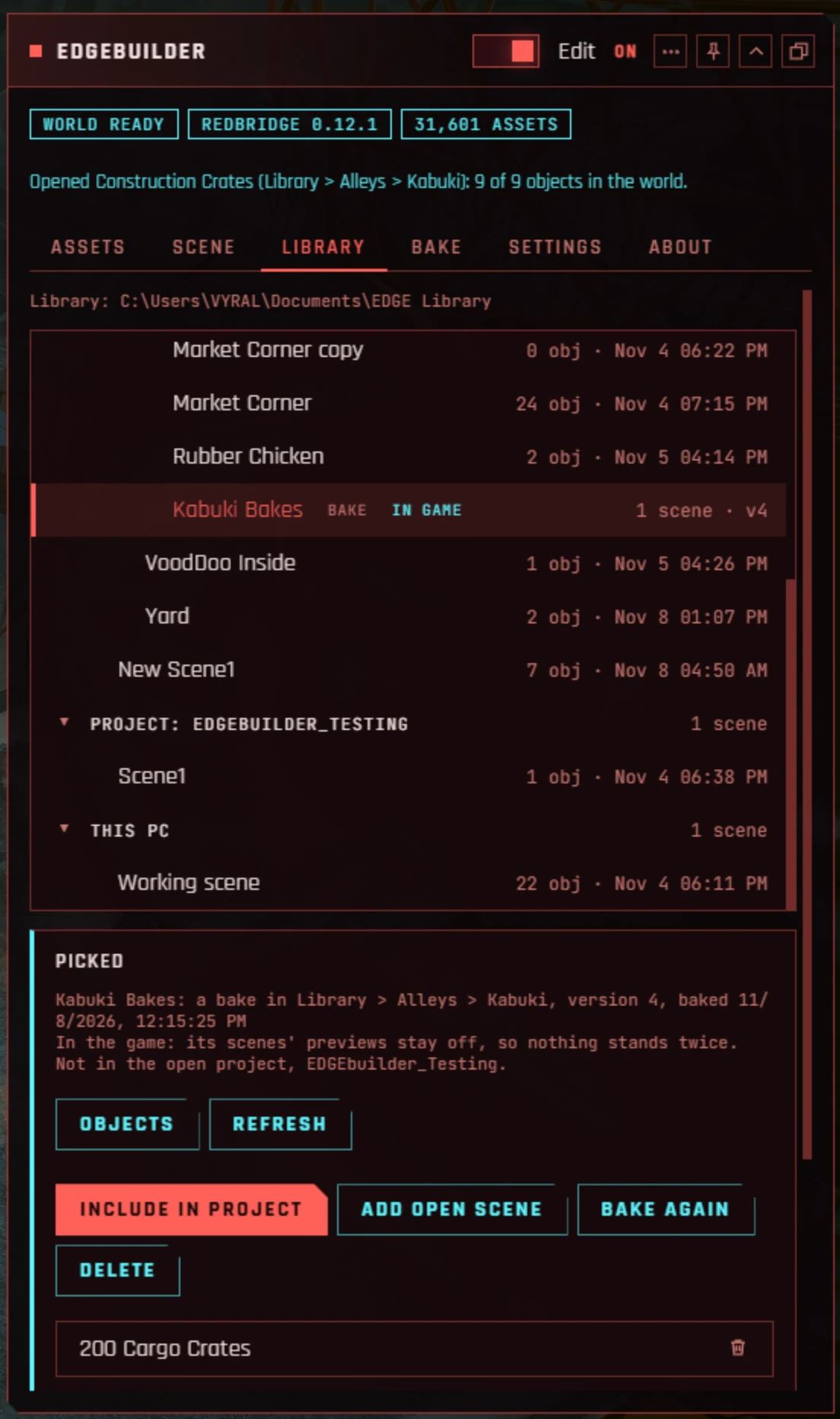
On disk, a Library bake is a folder named <name>.bake. The Library tab’s tree shows it with a bake tag, how many scenes it holds and its version, for example 2 scenes · v2. Pick it, and the Picked panel says where it is and whether the open project has it, and lists its scenes.
| Button | Does |
|---|---|
| Bake into Library | With a scene picked: bakes it into a new Library bake in the same folder. The bake is named by the Name field, or after the scene if Name is empty |
| Include in project | Copies the bake’s files into the REDcode project open in VS Code. The scenes stay in the Library, which is still where you edit them. When the project has an older version, the button reads Update in project to v3 (or whichever version is newest) |
| Add open scene | Bakes the open scene into this bake, as one more scene. The version goes up |
| Bake again | Bakes each of its scenes as it is now. The version goes up |
| Delete | Deletes the bake from the Library, after asking. The scenes stay, and so do copies already in projects |
| The trash icon by a scene | Takes that scene out of the bake, after asking. The version goes up. The scene itself stays |
After Include in project, do as for any bake: Pack and Install in REDcode, and restart the game.
In a project that includes a Library bake, the Bake tab shows where each scene came from, for example from Kabuki Bakes v2. Three rules:
- Updating. When the Library has a newer version, the Bake tab offers Update to v3. If a scene was taken out of the Library bake since, the update takes it out of the project too.
- No doubles. Include in project stops when the project already has its own bake of one of the same scenes, because the two would overwrite each other. Take that bake out on the Bake tab first.
- Making a scene the project’s own. If you bake one of those scenes with Bake on the Bake tab, it becomes the project’s own bake and no longer follows the Library.
The project notes where the files came from in source\library.json, a file every EDGE tool shares.
Tags in the tree and the Picked panel tell you about a Library bake:
| Tag | Means | Do this |
|---|---|---|
| stale | A scene changed since the bake | Press Bake again |
| scene missing | A scene in the bake was moved or deleted. The bake still works, and Bake again keeps that scene as it was baked | Put the scene back, or take it out with its trash icon |
| collides | Another Library bake holds the same scene. With both in one game, its objects would be there twice. The Picked panel says which bake | Take the scene out of one of the two bakes |
| in project | The open REDcode project includes it | |
| in game | The game loaded it at its last start |
Try it: a bake in the Library
- On the Library tab, pick a scene with a few objects, type
My Bakesin Name and press Bake into Library. My Bakes shows in the tree, tagged bake, with1 scene · v1. - Open a second scene, pick My Bakes and press Add open scene. It now holds 2 scenes, at version 2.
- Open the REDcode project, pick My Bakes and press Include in project. On the Bake tab, both scenes show from My Bakes v2.
- Quit, Pack and Install in REDcode, and start: both scenes are in the world.
- Move one object in one of the scenes. My Bakes is tagged stale. Press Bake again: version 3. On the Bake tab, press Update to v3, then Pack and Install again.