EDGEfab and assistants
Whatever you can do with EDGEfab’s buttons, an AI assistant can do too. You ask in plain words, such as “make me a rusty oil drum, 0.9 m tall, and add it to my project”, and the assistant draws it, makes it 3D, sizes it and puts it in your mod.
It works because EDGEfab comes with an MCP server: a small program that offers EDGEfab’s abilities to an assistant as tools. MCP is the standard way AI assistants use tools. The assistant on this page is Claude Code, Anthropic’s assistant that runs in a terminal or inside VS Code.
| On this page | |
|---|---|
| What you can ask | Examples, and what comes back |
| Connect Claude Code | Three steps |
| Keys for the server | Only for making things from words |
| EDGEfab with EDGEchat | The whole trip, from words to the game |
| A prop by chat, step by step | A worked example |
| The tools | All twelve, with what they take |
| Other assistants | Agents in VS Code, other clients, npm |
| Good to know | Cost, privacy, and what it can write |
What you can ask
| Ask | What happens | Needs a key |
|---|---|---|
| “What’s on my EDGEfab Desk?” | The props and pictures there, with size, parts and license | No |
“Make a prop from D:\Models\crate.glb and set it to 0.6 m tall.” |
The model is prepared for the game and waits on the Desk | No |
| “Draw a rusty blue oil drum with a hazard sticker.” | A picture from four sides, on the Desk. Claude shows it to you | OpenAI |
| “Change picture 2 of the vending machine so the screen is cracked.” | That picture, changed by your words, as a new picture | OpenAI |
| “Make the vending machine 3D from picture 5, 2 m tall.” | Claude says the cost, then Tripo makes the model, in parts | Tripo |
| “Make its painted lights glow, bright.” | A glow map from the painted lights | No |
“Rename it Neon vending machine and add it to my project D:\Mods\NeonProps.” |
The game files, in your project | No |
| “Put the oil drum in my Library, under Production/Props.” | A Library prop, ready for any project | No |
“Which props in D:\Mods\NeonProps are newer in the Library? Update them.” |
The list, then the newer ones copied in | No |
| “How many Tripo credits do I have?” | Your balance, and the plan recorded. Never the key | Tripo |
Claude works on the same Desk and Library as the extension. A picture Claude draws shows in the Pictures tab at once, and a prop you made by hand is there for Claude.
Connect Claude Code
The server comes with the EDGEfab extension. You need Claude Code installed.
- In VS Code, open the command palette (
Ctrl+Shift+P) and run EDGEfab: Connect an Assistant (MCP)…. - Choose Connect Claude Code.
- Start a new Claude Code session. A session that was already open doesn’t see the new tools.
| What you should see | |
|---|---|
| After step 2 | “EDGEfab is connected to Claude Code. Start a new Claude Code session and ask it to make a prop.” |
| After step 3 | Ask “Which EDGEfab tools do you have?”: Claude lists tools whose names start with fab_. Or run claude mcp list in a terminal: edgefab shows as connected |
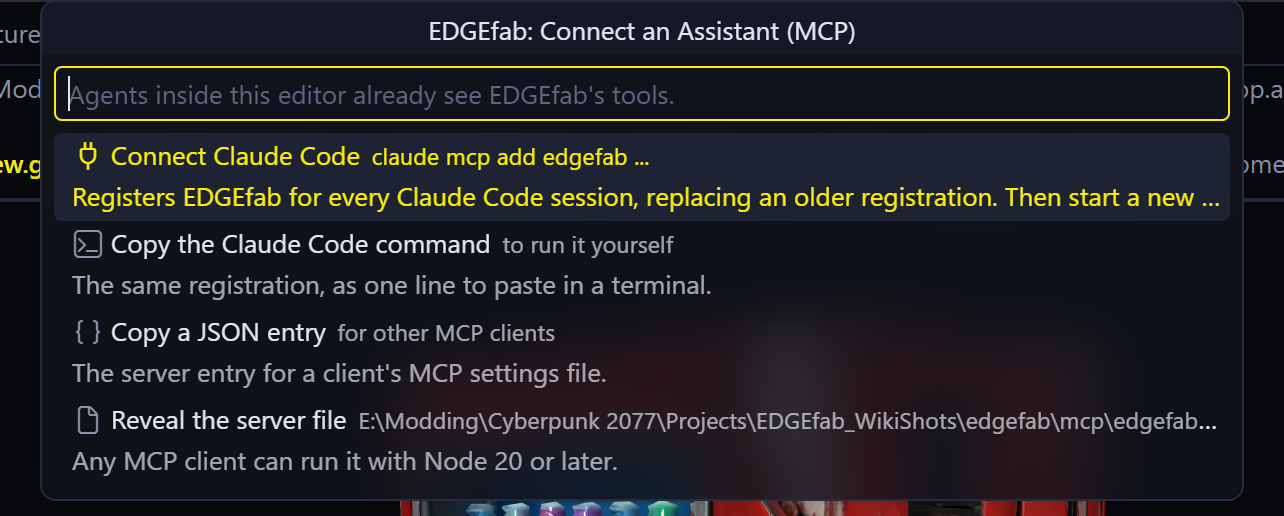
This connects EDGEfab for every Claude Code session on your PC, whichever folder you start it in. Connecting again replaces the earlier connection. You don’t need to install anything else: without Node.js 20 or later, the server runs with the copy built into VS Code.
By hand. Copy the Claude Code command gives you the same thing as one line to run in a terminal:
claude mcp add --scope user edgefab -- "node" "C:\Users\<you>\AppData\Local\EDGEfab\mcp\edgefab-mcp.cjs"
If EDGEfab can’t find Claude Code’s claude command, it offers to copy this line for you.
Keys for the server
Without any key, the server still prepares models you bring, sizes them, makes them glow, renames them, adds them to projects and runs the Library. Only making things from words needs keys: OPENAI_API_KEY for pictures and TRIPO_API_KEY for 3D models.
Claude Code runs the server outside VS Code, so the server can’t read the keys EDGEfab keeps in VS Code’s secret storage. EDGEfab doesn’t hand them over either. The server reads them from Windows’ environment variables:
- Press the Windows key, type
environment, and open Edit environment variables for your account. - Under User variables, press New…. Name:
TRIPO_API_KEY. Value: your key. Press OK. - Do the same for
OPENAI_API_KEY. - Close every VS Code window and every terminal, and open them again. Programs read these variables only when they start.
- Start a new Claude Code session and ask: “Is EDGEfab’s Tripo key set?”
| What you should see | |
|---|---|
| The keys are read | Claude answers that the key is set and gives your credit balance. It never sees or shows the key itself |
| “No OpenAI API key” or “No Tripo API key” | The server started before the variable was set. Close every VS Code window, so the whole program exits, and open it again |
| “OpenAI refused the key” | The key is wrong, revoked, or belongs to a project that is switched off. Make a new one |
A user environment variable can be read by any program you run. That is how the server gets it, and it is also the risk. If you don’t want that, leave the keys out and make pictures and models with EDGEfab’s own buttons: Claude can still do everything else.
Tell Claude your Tripo plan once (“my Tripo plan is paid”), so each model is marked as yours: see Your Tripo plan. If you already answered in EDGEfab, the server knows.
EDGEfab with EDGEchat
EDGEchat is the EDGE plugin for Claude Code. One install connects four tools: REDnode, REDcode, EDGEdeck and EDGEmat. EDGEfab is not in it yet, so connect EDGEfab as above. The two work side by side, and nothing shows twice.
Together they cover the whole trip from a sentence to the prop standing in the game:
| Step | Tool | Connected by |
|---|---|---|
| Draw it, make it 3D, size it, glow, rename | EDGEfab (fab_ tools) |
Connect an Assistant |
| Add it to the project | EDGEfab | Connect an Assistant |
| Give one part a game material | EDGEmat (mat_ tools) |
EDGEchat |
| Pack the project into a mod | REDcode | EDGEchat |
| Install the mod, or turn it off | EDGEdeck | EDGEchat |
| Swap it into the running game, spawn it, look at it | REDnode | EDGEchat |
With both connected, one message can go the whole way:
Draw a neon noodle stand sign on a metal post. When I say it looks right, make it 3D at 3 m tall, make the neon glow bright, and add it to my project
D:\Mods\NeonProps. Then pack the project and swap it into my running game.
REDnode asks for your OK inside the game before the first swap. To be asked before anything that costs credits, say so in your message. To place the prop, use EDGEbuilder in the game: Tutorial, step 9.
| Good to know | |
|---|---|
| Install EDGEchat | Install and connect. /edge:setup checks its four connections |
| Game materials on a part | Asked through EDGEmat’s tools. Seen in the game once: Add to Project |
| All EDGE connections, side by side | Connect Claude Code |
A prop by chat, step by step
Each row is one thing you say, and the tool call Claude makes for it. You never type the tool calls: they are here, in short form, so you can read what Claude did.
1. “Draw a battered cyberpunk vending machine with glowing product shelves.”
{ "tool": "fab_picture", "words": "a battered cyberpunk vending machine with glowing product shelves" }
A new prop on the Desk with picture 1. Claude shows you the four views.
2. “Make the cabinet red and the glow blue.”
{ "tool": "fab_picture", "prop": "a_battered_cyberpunk_vending_machine_wit", "from": 1, "words": "make the cabinet red and the glow blue" }
Picture 2, changed from picture 1. Picture 1 is kept.
3. “Good. Make it 3D from picture 2, 2 m tall.”
{ "tool": "fab_make", "from": "picture", "prop": "a_battered_cyberpunk_vending_machine_wit", "take": 2, "height": 2 }
About 60 Tripo credits and four minutes. The prop on the Desk becomes a model, in parts.
4. “Make the lights glow, and call it Neon vending machine.”
{ "tool": "fab_glow", "prop": "a_battered_cyberpunk_vending_machine_wit", "action": "paint", "strength": 3 }
{ "tool": "fab_rename", "prop": "a_battered_cyberpunk_vending_machine_wit", "name": "Neon vending machine" }
5. “Add it to my project D:\Mods\NeonProps.”
{ "tool": "fab_add", "prop": "neon_vending_machine", "project": "D:\\Mods\\NeonProps" }
Claude answers with the entity’s game path, neonprops\props\neon_vending_machine\neon_vending_machine.ent, and what to do next: pack, then place.
The tools
You never have to name a tool: ask in plain words and the assistant picks.
| Tool | Does | Same as | Key |
|---|---|---|---|
fab_picture |
Draws an object from four sides. With prop and from, changes that picture by words. With prop alone, draws a new one into the same prop |
Pictures | OpenAI |
fab_make |
Makes a prop: from: "file" (a .glb), from: "picture" (a picture, any of them with take), or from: "tripo" (words alone) |
Import a GLB, Generate 3D Model | Tripo, except from a file |
fab_size |
Sets a prop’s height in metres | Set Size | |
fab_glow |
paint makes painted lights glow, strength sets how strongly, off stops it |
Glow | |
fab_desk |
Lists the Desk: each prop’s name, size, parts, pictures and license | The Desk | |
fab_rename |
Renames a prop, its files and materials too | Rename | |
fab_add |
Puts a prop into a project, from the Desk or from the Library. Adding it again keeps the materials that didn’t change and the parts given another material | Add to Project | |
fab_library |
Lists a Library folder. Sets the Library’s folder or your game folder, when you say where | The Library | |
fab_library_add |
Adds a Desk prop to the Library, or updates it there | Add to Library | |
fab_library_edit |
Brings a Library prop back onto the Desk to change | Edit on the Desk | |
fab_refresh |
Says which of a project’s Library props are newer in the Library, and copies them in | Refresh Project from Library | |
fab_tripo |
Whether a Tripo key is set, your plan and your credit balance. Records your plan | Tripo |
What the main tools take:
| Tool | Inputs |
|---|---|
fab_picture |
words. Optional: prop (a Desk prop to draw into), from (the number of the picture to change), name |
fab_make |
from. Then file, or prop with optional take, or prompt. Optional: name, height in metres, detail (standard or high), parts (on by default), plan |
fab_glow |
prop, action. Optional: amount 0 to 1 (how much counts as a light, 0.5 by default), strength, material (one part) |
fab_add |
prop, project. Optional: from (desk or library), name, mod (the folder under source\archive), collision (physical, box or none). Adding it again: textures (keep-unchanged or remake) and parts (keep or model). The answer’s kept and swapped say what stayed |
fab_library_add |
prop. Optional: folder (such as Production/Props), useGamePath, collision |
Other assistants
| Assistant | How |
|---|---|
| Agents inside VS Code 1.101 or later | Nothing to do: VS Code lists EDGEfab among its MCP servers. For pictures and models it needs the same Windows environment variables |
| Another MCP client | Connect an Assistant (MCP)…, Copy a JSON entry, for the client’s settings file |
| Without VS Code | From the release on, the same server is on npm as @edgemodders/edgefab-mcp. It needs Node.js 20 or later |
The JSON entry looks like this:
{
  "edgefab": {
    "command": "node",
    "args": ["C:\\Users\\<you>\\AppData\\Local\\EDGEfab\\mcp\\edgefab-mcp.cjs"]
  }
}
The server file is at %LOCALAPPDATA%\EDGEfab\mcp\edgefab-mcp.cjs, the same path for every version. Each update of the extension refreshes it, so a connection keeps working. Reveal the server file in the Connect list shows it.
Good to know
- It spends your credit.
fab_picturecosts a few cents of OpenAI credit each time.fab_makefrom a picture or from words costs Tripo credits. The server tells Claude the cost, and Claude should tell you before it pays. If you want to be asked every time, say so at the start: “ask me before anything that costs credits”. - It never changes the game. The server writes only onto the Desk, into the Library, and into the project you name.
- No telemetry. Its only network calls go to OpenAI and Tripo, with your keys, when you ask for a picture or a model. Claude Code talks to Claude with your own account.
- While it adds a prop, the server starts its own REDbridge. That is normal.
- Connected, but Claude doesn’t see the tools, or a key isn’t found? See Troubleshooting.