Game Materials
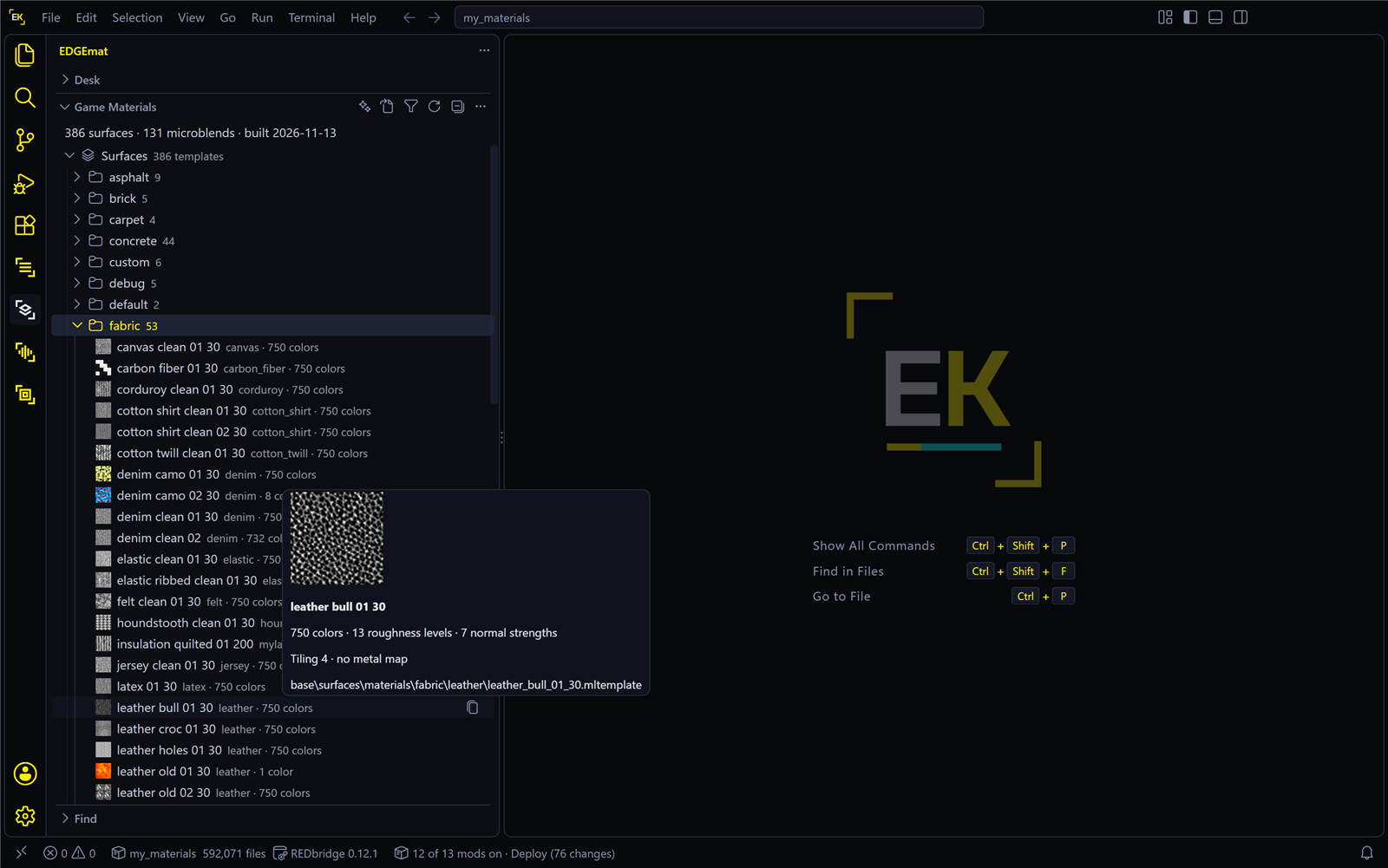
Game Materials is the middle view in EDGEmat’s sidebar, below the Desk. It lists the building blocks every layered material is made from, read from your own game.
You browse it to see which surfaces and colors exist before you recolor. You never have to: the setup editor offers the same lists when you change a layer.
| Group | What it holds |
|---|---|
| Surfaces, by category | About 390 surfaces: leather, denim, chrome, rubber, paint, dirt and more, grouped as the game groups them (fabric, metal, plastic and so on). A surface is one kind of stuff: a grey texture plus the list of colors and finishes it can take. Each layer of a garment uses one surface. In the game’s files a surface is an .mltemplate |
| Microblends | About 130 microblends: small detail patterns that a layer can carry on top of its surface, such as wear, dirt, scratches or prints. This group sits below all the surface categories |
The line at the top of the view counts them and says when the list was built, for example “386 surfaces · 131 microblends · built 2026-10-19”.
| On this page | |
|---|---|
| Looking around | Thumbnails, hover, click |
| Filter | Narrow the list by plain words |
| The title bar | Every button |
| Where the list lives | And what deleting it does |
Looking around
- Thumbnails show each surface’s texture. Most surface textures are grey, because the color comes from the layer, so the thumbnails are grey too. A few surfaces have a plain, flat texture: for those the thumbnail shows the surface’s bumps instead.
- Hover a surface for a larger thumbnail, how many colors it offers and its game path. Hover a microblend for its picture, name and game path.
- Click a surface or a microblend to open its surface page, with every color as a swatch.
- Copy Game Path (the copy icon that appears when you hover a row, or the right-click menu) puts the file’s game path on the clipboard, for WolvenKit, REDcode or a mod’s notes.
- Collapse All in the view’s title bar folds everything, so both top-level groups, the surface categories and Microblends, are visible at once.
Filter
Press the funnel in the view’s title bar (Filter Game Materials) and type plain words, such as leather, worn chrome or denim. A row matches only if its name or path contains every word you typed.
| What you should see | |
|---|---|
| The list | Only the matches, with their groups opened down to each one |
| The count at the top | The number of matches |
Clear Filter, the icon beside the funnel, brings the full list back, folded the way you left it.
The funnel only narrows this list. To find a garment by its name, use Find, the view below, which searches the game’s clothing.
Try it
- Press the funnel, type
worn chromeand press Enter. - Click one of the surfaces that is left.
- Press Clear Filter.
You should see a short list of chrome surfaces after step 1, and a surface page with that chrome’s colors after step 2.
The title bar
Hover the GAME MATERIALS header to see its buttons, left to right:
| Button | Does |
|---|---|
| New Material… (sparkle) | Opens the New Material page, not set to any garment |
| Open Setup… (a page with an arrow) | Opens a garment’s setup from the game, a file on disk, or a mod’s archive. See Opening a setup |
| Filter Game Materials (funnel) | Narrows the list by plain words |
| Clear Filter | Shown while a filter is set |
| Rebuild Game Materials (refresh) | Builds the list again from the game. Rarely needed: EDGEmat rebuilds by itself after a game update. With the thumbnails already made, a rebuild takes a few seconds |
... › Set Game Folder |
Picks the Cyberpunk 2077 install EDGEmat reads |
... › Show Log |
EDGEmat’s log, in VS Code’s Output panel. Start here when something looks wrong (Troubleshooting) |
... › Connect an Assistant (MCP)… |
Connects Claude Code to EDGEmat (Assistants) |
Where the list lives
In %LOCALAPPDATA%\EDGEmat, on your PC only. It is built from your game and never shipped, so EDGEmat stays current with game patches and carries no game data. The server for AI assistants uses the same list.
Deleting the list is safe: EDGEmat builds it again on its next start. But the same folder also holds the Desk, in its desk subfolder, with your edits on it. Don’t delete the whole folder while you have work on the Desk. See Where EDGEmat keeps things.
About the name. Up to EDGEmat 0.3.1 this view was called Library. It was renamed because the EDGE Library now means the folder of your own work that the EDGE tools share. It holds the same list as before, and the assistants’ tool for it is still called mat_library.