Your first session in EDGEkit
EDGEkit is installed and open. This page shows where things are, gets each tool ready, and ends with something to try.
The window
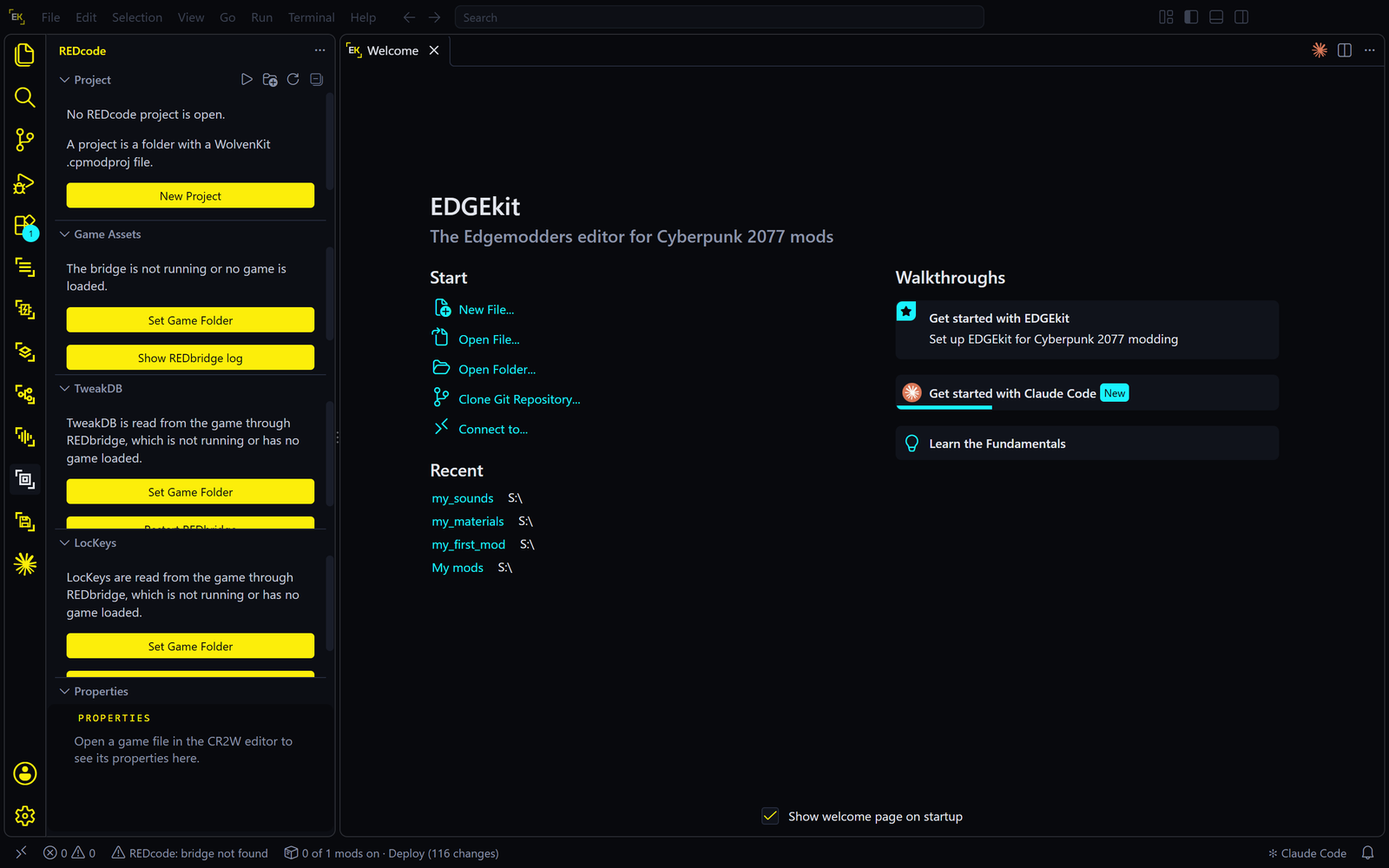
If you have used VS Code, you know this window. If not, four parts are enough to start:
| Part | Where | What it’s for |
|---|---|---|
| The activity bar | The strip of icons down the left edge | One icon per tool. Click one to open that tool’s panel |
| The side bar | Beside the activity bar | The panel of the tool you clicked: its lists and buttons |
| The editor | The large middle area | Whatever you open: a file, a material, a quest, the Welcome page |
| The command palette | Press Ctrl+Shift+P | A search box for every command. Type a tool’s name, such as EDGEdeck, to see what it can do |
Where each tool lives
Each built-in tool has its own icon in the activity bar. Hover over an icon to see its name.
| Icon | Opens | Start with |
|---|---|---|
| REDcode | Your project, the game’s files (Game Assets), the TweakDB and the game’s texts | REDcode |
| EDGEdeck | Mods: your mod library | EDGEdeck |
| EDGEmat | The Desk, Game Materials and Find | EDGEmat |
| EDGEwave | Sounds and Game Assets | EDGEwave |
| EDGEquest | Project Quests and Game Quests | EDGEquest |
| EDGEhack | The Desk, the Library and Quickhacks | EDGEhack |
| REDsave | Saves: your save games | REDsave’s docs |
Claude Code adds its own icon once it is installed.
Set up the tools
The tools are installed, but two of them need a first step before anything else works, because every tool reads the game through them.
- Tell REDcode where the game is. On the Welcome page, open the step Point REDcode at the game and press Set Game Folder. Pick your Cyberpunk 2077 folder. You do this once.
- Get REDbridge. REDbridge is the engine that reads the game’s files. Press Ctrl+Shift+P, type
REDcode: Install REDbridgeand press Enter. REDcode downloads it. More in Install and set up REDcode. - Set up EDGEdeck, if you want to manage mods. Click the EDGEdeck icon and follow its Set up steps. See Install and set up EDGEdeck.
The other tools set themselves up the first time you use them:
| Tool | Its first step |
|---|---|
| EDGEmat | Builds its list of the game’s materials once. See Install EDGEmat |
| EDGEwave | Needs a REDcode project open. See Install and set up EDGEwave |
| EDGEquest | See Install and set up EDGEquest |
| EDGEhack | Reads the game’s quickhacks the first time its view opens, about 15 seconds. See Install and set up EDGEhack |
The Welcome walkthrough
The Welcome page lists EDGEkit’s own steps. Each has a button that does the step for you. To open it again later, use Help, then Welcome.
| Step | What its button does |
|---|---|
| Sign in with GitHub | Optional. For sharing mod projects on GitHub |
| The EDGE tools | Says what is built in, and opens the list of EDGE extensions |
| Set up Claude Code for EDGE | Installs EDGEchat into Claude Code. See below |
| Point REDcode at the game | Sets the game folder |
| Get mods from Nexus Mods | Sends Nexus Mods’ Mod manager download button to EDGEdeck. Press it again if Vortex took the button back |
| The REDnode HUD theme | Lets you pick another colour theme |
| Open a mod | Opens a mod’s folder, or copies one from GitHub |
| Learn more | Links to the docs |
Claude Code and EDGEchat
Claude Code is Anthropic’s AI assistant: a chat panel in EDGEkit that can read files and do work for you. On its own it knows nothing about Cyberpunk modding. EDGEchat is the free add-on that teaches it, and connects it to the EDGE tools so it can read the game’s files, manage your mods and change materials. With both, you can ask for a mod in plain words: see EDGEchat.
What it needs. Claude Code needs a Claude account whose plan includes Claude Code. That is Anthropic’s, and paid for separately from EDGE. Sign in when Claude Code asks. See Claude Code’s setup.
Setting it up. EDGEkit asks “Set up Claude Code for EDGE?” once, after Claude Code installs. If you skipped it, run it now: press Ctrl+Shift+P and type EDGEkit: Set Up Claude Code for EDGE, or use the Welcome page’s step.
- Press Set Up. Claude Code opens its plugin dialog, showing EDGEchat.
- Install it there.
- EDGEkit opens a new Claude Code chat with
/edge:setupalready typed in its box. Press Enter to send it. - Claude checks its connections to the EDGE tools and lists what is ready and what is missing, with the next step for each. Expect some to be missing the first time: EDGEchat’s settings aren’t filled in yet. EDGEchat’s Install and connect takes it from there.
This passed the developer’s test on a fresh install of EDGEkit 1.140.2.
Try it
Pick the one that matches what you came for. Each is a walkthrough that ends with something in your game.
| You want to | Do this |
|---|---|
| Use mods made by others | Your first mod with EDGEdeck. Coming from Vortex? Switch from Vortex to EDGEdeck |
| Make a mod by asking for it | Your first mod with EDGEchat |
| Recolor a piece of clothing | EDGEmat |
| Change a quickhack | Your first quickhack |
| Look inside the game’s files | Game Assets in REDcode |