EDGEdeck
EDGEdeck is the EDGE platform’s mod manager for Cyberpunk 2077. It runs inside VS Code (and inside REDcode, which is built on VS Code) and looks after the mods you download: it keeps them, puts the ones you want into the game, takes them out again, and tells you when two of them fight over the same thing.
Used REDdeck? EDGEdeck was called REDdeck up to version 0.26.6. It is a new extension, so nothing carries over: in REDdeck, turn every mod off and deploy, then uninstall REDdeck, install EDGEdeck and add your mods again. REDdeck kept the original downloads in %USERPROFILE%\REDdeck\downloads, so you can add them from there.
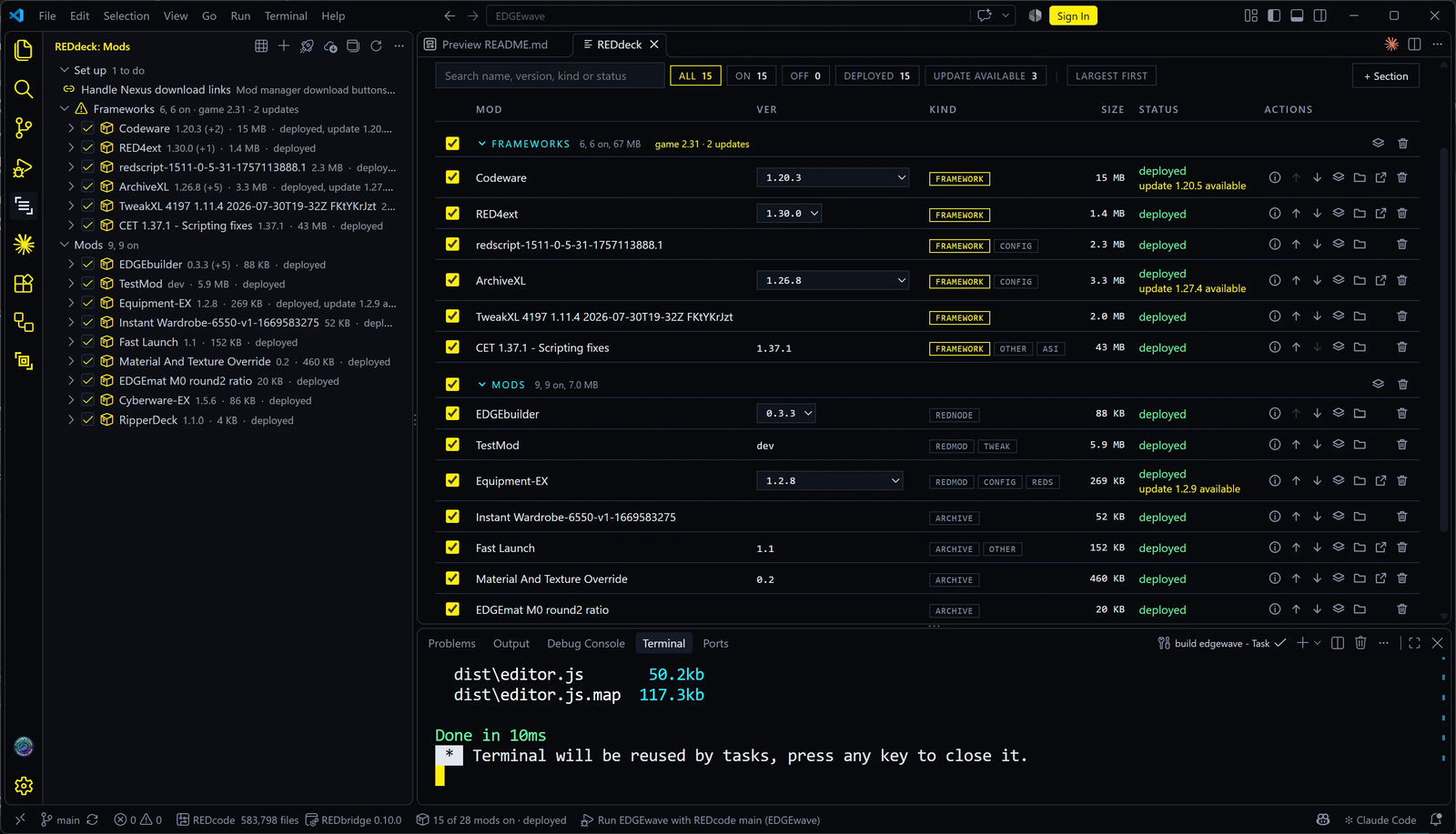
What it’s for
Cyberpunk 2077 has no built-in list of mods. A mod is a set of files dropped into the right folders inside the game folder: archives in one place, scripts in another, plugins in a third. Doing that by hand works for two or three mods. With twenty, you lose track of which file came from which mod, removing a mod means hunting for its files, and a game update can quietly break everything.
A mod manager does that bookkeeping for you. EDGEdeck:
- keeps your mods in a library outside the game folder, so turning a mod off doesn’t mean deleting it;
- deploys the mods you switch on into the game folder, and records every file it puts there;
- undoes a deploy exactly, removing only the files it placed;
- shows conflicts when two mods change the same thing, and lets you choose the winner;
- checks Nexus Mods for updates and downloads them for you.
Why you might want it
| If you… | EDGEdeck gives you |
|---|---|
| Find other mod managers confusing | One list of mods and four verbs: add, turn on or off, deploy, remove. Plain words, and no staging, purges or rules to learn |
| Worry about breaking your game | Every deploy is recorded in a manifest and can be undone. EDGEdeck never deletes a file it didn’t put there |
| Have mods that clash in strange ways | EDGEdeck sees conflicts inside mod archives, which file-based managers like Vortex can’t see, and explains who wins |
| Already use Vortex | A one-click import of your Vortex mods. Vortex keeps its copies, so you can go back |
| Want an AI assistant to manage mods for you | A command line and an MCP server with the same verbs, so Claude or another agent can list, add, switch and deploy mods, asking you before it touches the game |
| Make mods in REDcode | Your project’s packed output becomes a mod that refreshes every time you pack |
How it fits into EDGE
EDGEdeck is the Deploy stage of the EDGE platform. It works on its own, and other toolkits add to it when they’re present:
| Toolkit | What it adds to EDGEdeck |
|---|---|
| REDbridge | Reads inside mod archives, so EDGEdeck can show archive-level conflicts. EDGEdeck downloads and updates it for you |
| REDcode | A REDcode project can become a EDGEdeck mod, and EDGEdeck mods can feed files back into a project |
| Claude and other agents | EDGEdeck’s MCP server lets an AI assistant manage your mods |
Status
EDGEdeck is at version 0.26.3 and manages its developer’s game on two PCs. It’s on the VS Code Marketplace and Open VSX since 0.26.0 (14 October 2026), marked Preview: young, and Windows only. Deploy, undo and the library are in daily use; Nexus downloads and REDmod deploys have had little real-world use so far. Nexus sign-in through the browser is built and waits for Nexus to register EDGEdeck; until then you paste a personal API key, which works the same way.
In this section
| Page | |
|---|---|
| Install and set up | Requirements, installing, the Set up steps, updating and uninstalling |
| Switch from Vortex | Move your mods over safely |
| The Mods view and the EDGEdeck page | Find your way around, group mods in sections, and set who wins |
| Adding mods | From files, folders and Nexus, and how EDGEdeck decides where files go |
| Deploying and undo | What deploy does, closing the game first, hardlinks, changes outside EDGEdeck, deploy reports, undo |
| Conflicts | What they are, who wins, and how to choose |
| Nexus Mods | Signing in, download links, updates and versions |
| Frameworks and game patches | RED4ext, CET, redscript and friends, and what to do after a game update |
| Library, disk space and loadouts | Where everything is kept, what uses space, loadouts you switch between |
| EDGEdeck and REDcode | Testing your own mods, and borrowing files from installed ones |
| Assistants and the command line | Let Claude manage your mods, or script EDGEdeck |
| Settings and commands | Every setting and command |
| Troubleshooting | Symptoms and fixes |
The EDGEdeck guide and design on EDGEdeck’s own docs site are the reference this section draws on.