Install and set up
| On this page | |
|---|---|
| What you need | |
| Install | From the editor, or from a file |
| The first start | What you should see |
| Your keys | Only for making things from words |
| Your Tripo plan | Paid or free, and why it matters |
| Updating and removing |
What you need
| Need | For | Notes |
|---|---|---|
| Windows 10 or 11, 64-bit | Everything | |
| VS Code 1.70 or later, VSCodium, or the EDGEkit app | EDGEfab runs inside the editor | |
| REDcode | Add to Project, packing the mod, the 3D view | It brings REDbridge, which writes the game’s files. EDGEfab uses REDcode’s game folder, so there is nothing more to set up |
| Cyberpunk 2077, version 2.5 | Add to Project reads one game file as a starting point | |
| A Tripo API key | 3D models made from words | Your own, with credits. Not needed for a model you bring yourself |
| An OpenAI API key | The picture drawn first | Optional, your own |
| EDGEbuilder on REDnode | Placing the prop in the game | Optional for making props, needed to place them |
Install
From the editor. Open the Extensions view (Ctrl+Shift+X), search for EDGEfab and press Install. It updates itself from then on.
From a file. Download edgefab-<version>.vsix from GitHub or Nexus Mods. In the Extensions view, press ... at the top, choose Install from VSIX… and pick the file.
EDGEfab is a VS Code extension, not a game mod. Don’t install it with Vortex or put it in the game folder.
The first start
Click the EF icon in the activity bar, the strip of icons at the far left. Two views open in the side bar:
| View | Shows at first |
|---|---|
| Desk | Two buttons, Import a GLB… and Generate from Words…, with a line on what EDGEfab does |
| Library | Set Up the Library…, if no EDGE tool has set the Library up on this PC yet. The Library is optional |
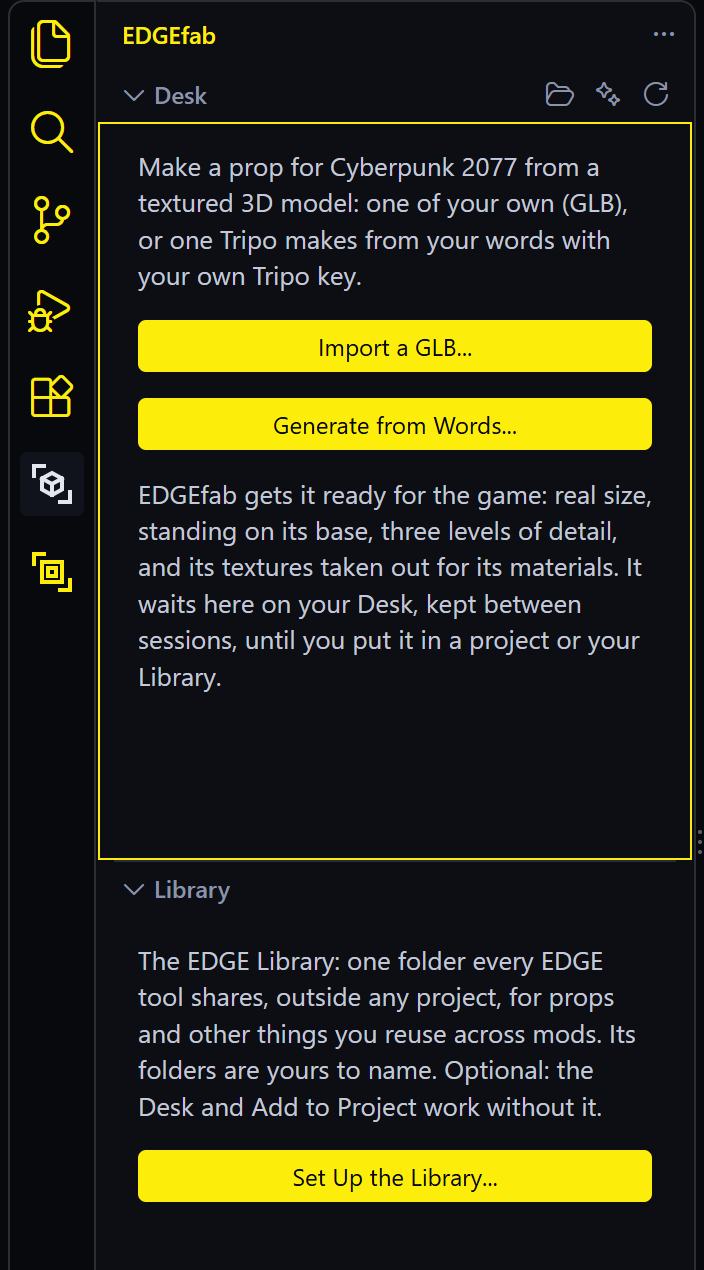
Nothing is asked until you make something. To check the install without a key, right-click any .glb file in VS Code’s Explorer and choose Make a Prop (EDGEfab): it appears on the Desk in under a minute.
Your keys
Keys are needed only for making things from words. EDGEfab asks for a key the first time it needs one, in a password box. You can also set them ahead of time from the command palette (Ctrl+Shift+P):
| Command | Key | Where to get it |
|---|---|---|
| EDGEfab: Set Tripo Key | Starts with tsk_ |
platform.tripo3d.ai, under API keys |
| EDGEfab: Set OpenAI Key | Starts with sk- |
platform.openai.com |
| Good to know | |
|---|---|
| Where a key is kept | Encrypted in VS Code’s own secret storage, for EDGEfab only. It is sent only to the service it belongs to |
| Removing one | EDGEfab: Clear Tripo Key or Clear OpenAI Key |
| Environment variables | If TRIPO_API_KEY or OPENAI_API_KEY is set in Windows, EDGEfab uses that one first |
| Assistants | Claude Code runs EDGEfab’s server outside VS Code, so it can’t read these keys. See Assistants: keys |
Your Tripo plan
The first time you make a model, EDGEfab asks which Tripo plan your key is on:
| Answer | Means |
|---|---|
| Paid plan (Pro, Advanced, Premium, or bought API credits) | The models are yours to use, change and release in mods |
| Free plan | Tripo keeps all rights to the models, so they can’t go in a released mod. EDGEfab marks them so |
The answer is recorded with every model you make, and it travels with the prop into your project. Change it any time with EDGEfab: Set Tripo Plan (Paid or Free). The rule is from Tripo’s terms, section 5.2: read them yourself before you release a mod.
Updating and removing
| To | Do |
|---|---|
| Update | Nothing: the editor updates extensions on its own. After a file install, install the newer .vsix over it |
| Remove EDGEfab | Extensions view, EDGEfab, Uninstall |
| Remove its data too | Delete %LOCALAPPDATA%\EDGEfab. That holds the Desk, so move anything you want to keep into a project or the Library first |
Uninstalling leaves your projects and the EDGE Library alone.
Next: Tutorial: your first prop.