Adjusting and pins
The 3D preview is good for timing. Where people should stand is easier to judge in the place itself. EDGE Director lets you put that right while you stand there: each change is saved into the scene’s file at once, and the scene open in VS Code follows.
Untested in the game, like the rest of EDGE Director. Moving a person while they play an animation is one of the things the first tests must show.
| On this page | |
|---|---|
| Adjust | Moving and turning an actor |
| The scene’s place | In front of V, or fixed to a spot |
| Pins | Named places, dropped where V stands |
| Pins in VS Code | The same pins in the editor |
| Two tools, one scene | Who may change what, and when |
Adjust
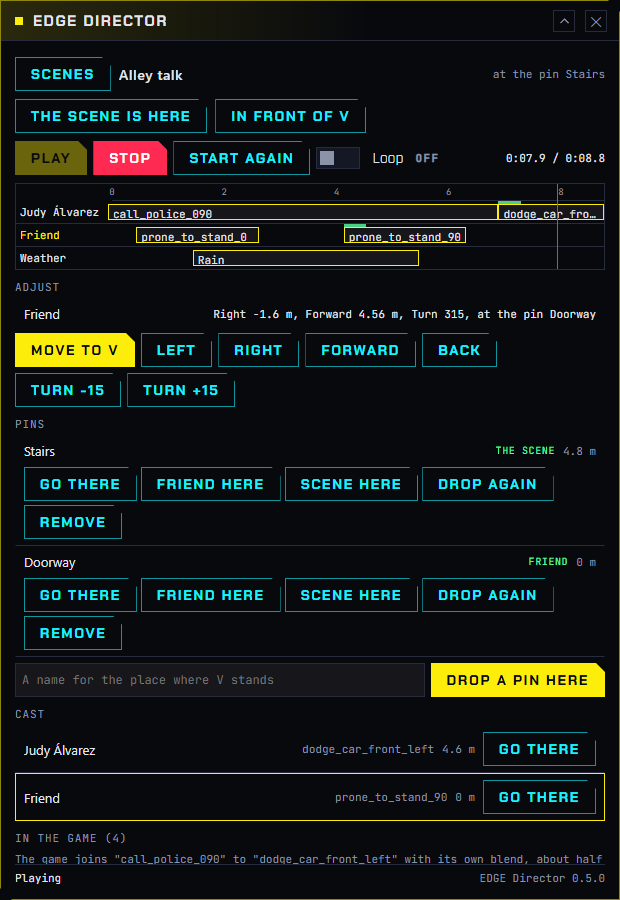
Choose an actor: click their name at the left of the strip, or their row in Cast. Adjust shows their mark and these buttons:
| Button | Does |
|---|---|
| Move to V | Their mark becomes where V stands, facing as V faces. Walk V to the spot, look the way they should look, and press it |
| Left, Right, Forward, Back | Moves the mark 10 cm |
| Turn -15, Turn +15 | Turns them 15 degrees |
An actor who is in the game moves at once and plays on. With nothing playing, the mark still changes in the file.
Two cases where it says no:
| The scene plays in front of V and is not in the game | Move to V has nothing to measure from. Press Play first, or give the scene a place (below) |
| The actor is placed by a set | Move the person in EDGEbuilder; the scene follows |
To type exact numbers, use the inspector in VS Code.
The scene’s place
A new scene plays in front of V, wherever V is when you press Play. That is handy for trying things, and wrong for a scene that belongs somewhere.
| Button | Does |
|---|---|
| The Scene Is Here | The scene keeps the spot it is playing at now. Nobody moves; from then on it plays there, wherever V is. With nothing playing, it takes the spot a play would use now: 3 m in front of V |
| In Front of V | Undoes it. A scene in the game moves in front of V at once |
The header says which it is. A scene on a set plays where the set is, and has neither button.
Pins
A pin is a named place in the world. Pins are REDnode’s world pins: a pin has a title and a place, stands in the world with its name over it, and is kept in a small file.
Walk V to a spot, type a name under Pins, and press Drop a Pin Here. The first pin makes the scene’s own pin file, beside the scene on the Desk. The open scene’s pins are drawn in the world; they go when you leave the scene.
For each pin:
| Button | Does |
|---|---|
| Go There | Puts V at the pin |
| The chosen actor’s name and Here | That actor stands at this pin, and follows it. Choose an actor first |
| Scene Here | The scene’s place is this pin, and follows it |
| Drop Again | Moves the pin to where V stands now. Whatever follows it moves with it: an actor in the game at once |
| Remove | Takes the pin away. What followed it stays where it is |
Following is the point of a pin. An actor “at the pin Doorway” keeps standing at that pin when you move it, in the game and in the file. A mark you nudge or type by hand lets go of its pin.
An actor can stand at a pin only in a scene that has a place: at a pin, at a spot (The Scene Is Here), or on a set. In a scene that plays in front of V, places in the world mean nothing, and the window says so.
Pins in VS Code
The scene editor shows the same pins. Click an empty part of the timeline; the inspector has a Pins section.
| There | Does |
|---|---|
| Choose Pins… | Takes a pin file for the scene: the scene’s own, one of your pin sets from REDnode’s Pins window in the game, one in the open REDcode project, or any .pins.json file |
| The scene’s place | In front of V, or one of the pins |
| The list | Each pin with its place and what follows it |
| Remove Pins | The scene forgets its pins. Everything keeps its place and follows nothing |
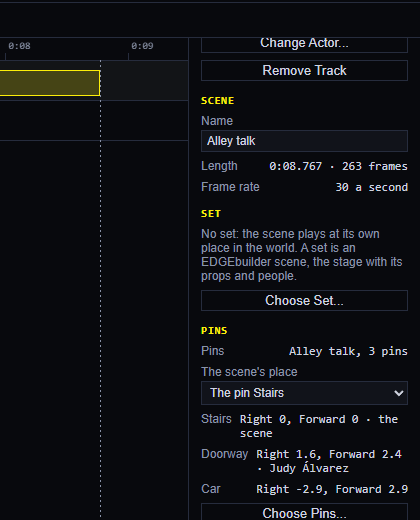
For an actor, the track’s inspector has At pin: pick a pin, or None.
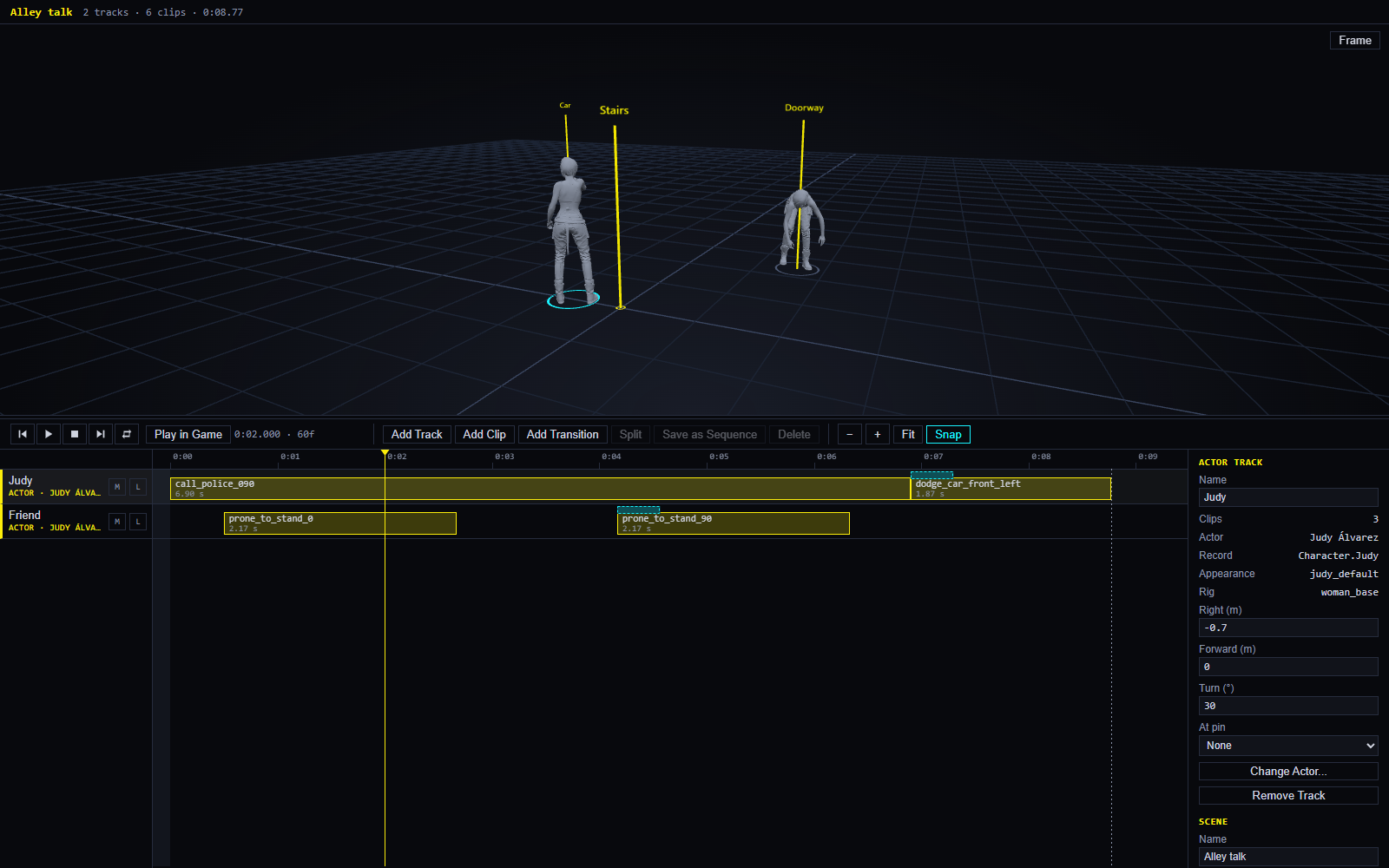
In the preview each pin is a thin yellow post with its name, when the scene has a place in the world. EDGEdir reads your pin sets from REDnode’s folder and never changes them. An open scene follows its pin file: move a pin in the game, and within a few seconds the post and the actor move in the editor.
Two tools, one scene
There is one scene file, and both tools change it.
| When | What happens |
|---|---|
| EDGE Director changes a scene that is open and saved in VS Code | The editor shows the change by itself |
| The scene has unsaved changes in VS Code | EDGE Director shows a yellow box. It still plays the scene, with the unsaved changes, but its Adjust and Pins buttons are off until you save. So neither tool overwrites the other |
| VS Code is closed | EDGE Director changes the file; VS Code sees it when it next opens the scene |
That VS Code’s editor shows a change from the game at once, and that Undo there takes it back, has not been checked yet.