EDGEdir
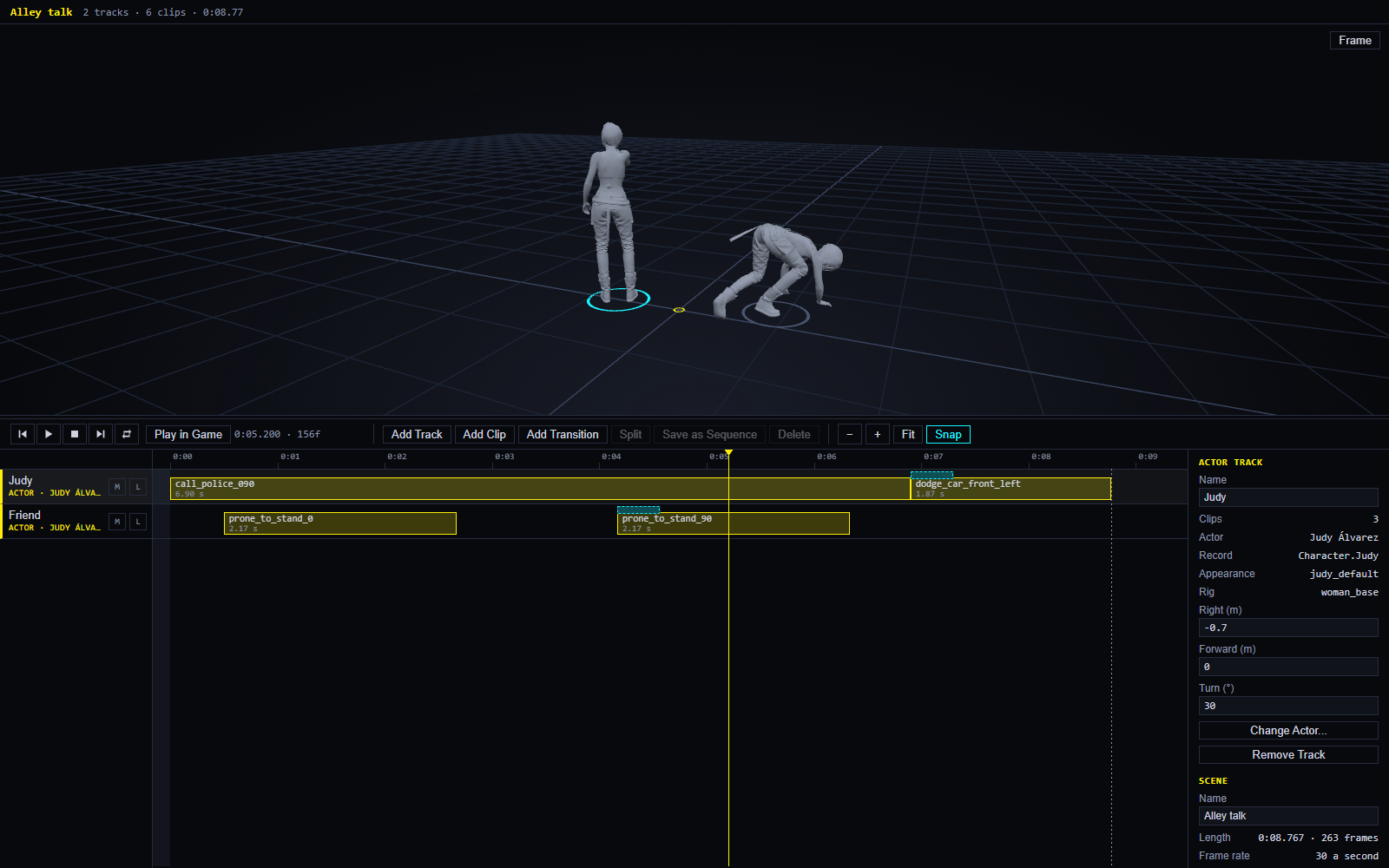
EDGEdir is a director’s tool for Cyberpunk 2077. You make a scene: a timeline that says what each person does, and when. You pick the game’s own characters as actors, give them the game’s own animations as clips, join the clips so they move as one, and watch it all in a 3D view. Then you play the scene in the running game, on real people, where it belongs.
It has two halves that work on the same scene:
| EDGEdir, in VS Code | EDGE Director, in the game | |
|---|---|---|
| Is | The editor: the timeline, the clips, the 3D preview | A window in the game: the same scene, on real people, in its real place |
| Best at | Building a scene: choosing animations, timing, transitions | Seeing it, and putting things right where they stand |
You don’t write code for any of this.
EDGEdir is not released yet. It is built and its tests in VS Code have passed. In the game, only the first steps have run so far: EDGE Director played a scene of two people through on 2026-11-20. This section describes what is built; where something is untested, it says so. To try it now you build it from its source: see Install and set up.
| On this page | |
|---|---|
| What it’s for | Why a scene is hard to make by hand |
| What it can do | The features, each with its page |
| Words you’ll meet | Scene, track, clip, actor, mark and the rest |
| How it fits into EDGE | What it needs from the other tools |
| Status | What is built, what was tested, what is not |
| In this section | Every page |
What it’s for
The game has about 6,600 characters and about 147,000 animations. Making a person stand somewhere and do three things in a row, in time with someone else, normally means writing game files by hand and restarting the game to see each try.
EDGEdir reads the characters and animations from your own game and lets you lay them out on a timeline, as a video editor lays out film. The 3D preview shows the result at once, with no game running. When it looks right, EDGE Director plays it in the game: it spawns the people, starts each on their first animation, and moves each to their next one on time.
What it can do
| You can | Where |
|---|---|
| Make a scene as a timeline with tracks and clips: move, trim, split, copy, undo | The scene editor |
| Pick actors from the game’s characters, and V | Actors and animations |
| Find animations by name among the game’s, and put them on an actor’s track | Actors and animations |
| Watch it in 3D: each actor’s body plays the clip under the playhead | The 3D preview |
| Place the actors: where each stands and which way they face | The 3D preview |
| Join clips with a transition, so two animations view as one movement | Transitions and sequences |
| Reuse a run of clips as a sequence, on any actor with the same skeleton | Transitions and sequences |
| Use a stage: play a scene on an EDGEbuilder scene, with its props and people | Sets |
| Play it in the game, from VS Code or from a window in the game | Playing in the game |
| Adjust it in the game: move an actor to where V stands, nudge and turn them, fix the scene to a spot | Adjusting and pins |
| Name places with pins, and have actors and the scene follow them | Adjusting and pins |
| Change the weather for part of a scene | Weather |
Not built yet: sound and camera tracks, packing a scene into a mod other players install, and V acting in a scene in the game. The timeline already has tracks for them, which hold named blocks for now.
Words you’ll meet
| Word | Means |
|---|---|
| Scene | One timeline: who does what, and when. A file ending in .edgedir |
| Track | One lane of the timeline. An actor track is one person; there are also audio, camera, weather, script, video and AI tracks |
| Clip | A block on a track. On an actor’s track a clip is one animation, played for as long as the block is |
| Actor | A character of the game chosen for a track, or V |
| Animation | One movement from the game’s files, such as a wave or a walk |
| Rig | A character’s skeleton. An animation is made for one rig, and plays only on actors with that rig |
| Mark | Where an actor stands in the scene and which way they face: metres right and forward of the scene’s middle, and a turn in degrees |
| Transition | A short block over the join between two clips that blends one into the other |
| Sequence | A run of clips with their transitions, stored by itself and reused |
| Set | The stage a scene plays on: an EDGEbuilder scene, with its props and people |
| Pin | A named place in the world, dropped where V stands. REDnode’s world pins |
| The Desk | Where EDGEdir keeps the scenes you are working on, on this PC |
| EDGE Director | EDGEdir’s app in the game. It plays and adjusts scenes there |
How it fits into EDGE
| It needs | For |
|---|---|
| REDbridge | Reading your game’s characters and animations, and the bodies for the 3D preview. REDcode installs it; EDGEdir can also use its own copy |
| REDnode in the game | EDGE Director is a REDnode app. REDnode spawns the people, plays their animations and sets the weather |
| EDGEbuilder, optional | Making a set: the props and people a scene plays among |
| EDGEdeck or Vortex, optional | Installing EDGE Director’s file into the game |
Status
Version 0.0.29 with EDGE Director 0.6.0, not released (2026-11-20).
| Part | Built | Tested |
|---|---|---|
| The scene editor, the Desk | Yes | In VS Code, by script: every step passed |
| Actors, the animation search, animations as clips | Yes | In VS Code, by script: every step passed |
| The 3D preview, marks | Yes | In VS Code, by script: every step passed |
| Transitions and sequences | Yes | In VS Code, by script: every step passed |
| Sets | Yes | In VS Code, by script: every step passed, with a hand-written set file. Not yet with a scene EDGEbuilder itself saved |
| Play in Game from VS Code | Yes | In VS Code against a stand-in for the game: passed. Not in the game |
| EDGE Director’s window: opening and playing a scene | Yes | In the game, 2026-11-20: it started, listed the Desk, and played two people through, on time and on the right sides. Pause, the playhead, Loop and the rest are not run there yet |
| EDGE Director: adjust, pins | Yes | Only by its makers against a stand-in. Not in the game |
| Weather | Yes | Not yet, in VS Code or in the game |
| Sound, camera | No | |
| Packing a scene into a mod | No |
“By script” means a Claude session ran the test’s steps with real mouse and key presses in a VS Code window; nobody watched. The owner’s own tests by hand, and everything in the game, are still to come. The full record is on EDGEdir’s Tests page.
What is known not to match yet between the preview and the game is listed on Playing in the game.
In this section
| Page | What it covers |
|---|---|
| Install and set up | What you need, building it from source for now, and EDGE Director in the game |
| Your first scene | A walk-through: one actor, two animations, a transition, the preview |
| The scene editor | The timeline, clips, the transport, the inspector, the Desk, keys |
| Actors and animations | Choosing actors, reading the game, searching animations, the rig rule |
| The 3D preview | The view, the bodies, marks |
| Transitions and sequences | Joining clips, and reusing a run of them |
| Sets | Playing a scene on an EDGEbuilder scene |
| Playing in the game | EDGE Director’s window, Play in Game, what the game will not match |
| Adjusting and pins | Moving actors and the scene in the game, and named places |
| Weather | The weather track |
| Settings, commands and keys | Every setting, command, view and key |
| Troubleshooting | When something does not work |