Tutorial: your first sound mod
In this tutorial you take the sound V’s katana makes when it is drawn, make it sound as if it came through a cheap radio, and hear it in the game. You click through it yourself: no coding, no AI, no paid account. It follows the steps of EDGEwave’s own test, on the same sound, and that test’s result was heard in the game.
| Time | About 20 minutes, half of it the game starting |
| Before you start | EDGEwave and REDcode are installed, and Game Assets shows its three groups (Install and set up). The game is closed |
| In the game | A katana in V’s inventory. If you have none, REDnode’s Console can give you one, in step 6 |
| On this page | |
|---|---|
| 1. Make a project | The folder your mod lives in |
| 2. Find the sound | By its name |
| 3. Open it | Into the sound editor |
| 4. Make it a radio | One menu, with undo |
| 5. Add it to the project | Say what it replaces |
| 6. Into the game | Pack, install, draw the katana |
| What to listen for | And what to do if you hear no change |
| Put it back, Try next |
Three words first. The game plays sounds by event: w_melee_katana_equip is its name for “V draws a katana”. An event can have several recordings, its variations, and the game picks one each time. Each recording has a number, its hash. In this tutorial you replace one recording. The game’s own files are never touched: your version goes into a mod.
1. Make a project
A project is a folder that holds your mod’s files until they are packed into a mod.
- Open the command palette (
Ctrl+Shift+P) and run REDcode: New Project. - Name it
my_sounds. Small letters and no spaces keep the game happy. - Choose a folder to create it in, anywhere outside the game folder.
| What you should see | |
|---|---|
| VS Code | Opens the new folder |
| REDcode’s Project view | The project, with Archive, Raw, Resources and Packed under it |
Leave the project open. EDGEwave saves into the project REDcode has open.
2. Find the sound
- Click EDGEwave’s icon in the activity bar, the strip of icons down the left edge of VS Code.
- Move the mouse over the Game Assets view and press the funnel icon in its title bar (Filter the Game’s Sounds).
- Type
katana equipand press Enter. - Under Sound effects, find
w_melee_katana_equip. Move the mouse over it and press ▶ to hear it. - Click the small arrow beside its name to unfold it.
| What you should see | |
|---|---|
| After step 3 | A handful of events under Sound effects, such as w_melee_katana_equip and w_melee_katana_unequip. The grey text beside each says how many variations it has |
| After step 4 | You hear the katana being drawn. The status bar at the bottom of VS Code names the recording that played |
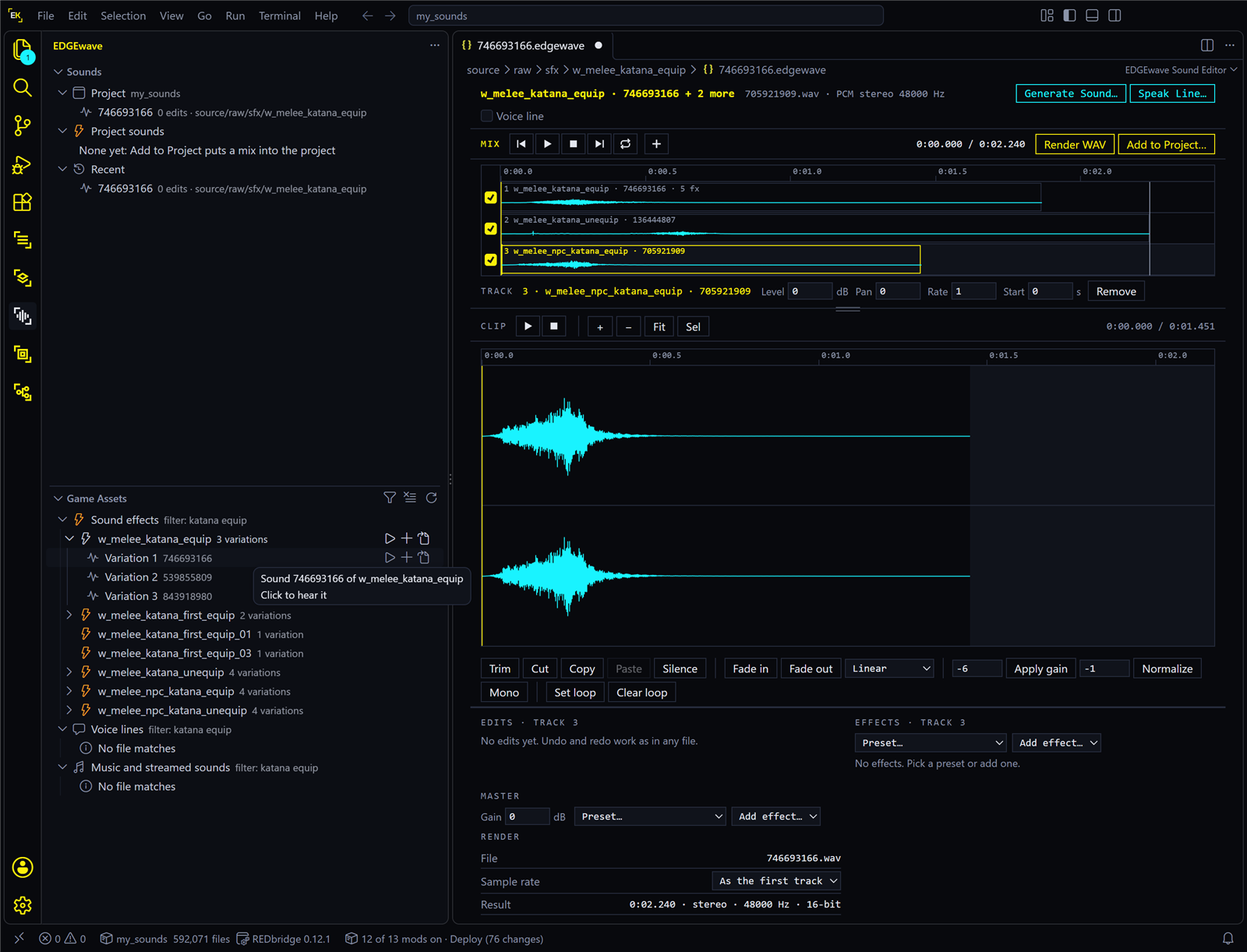
| After step 5 | Rows named Variation 1, Variation 2 and so on, each with its hash in grey. On the game version these pages were checked with, there are three, and Variation 1 is 746693166 |
Press ▶ on each variation to hear how they differ.
3. Open it
Move the mouse over Variation 1. Three small buttons appear at the right of the row: ▶, + and a page with an arrow. Press the last one, Open in EDGEwave. You can also right-click the row and choose Open in EDGEwave.
| What you should see | |
|---|---|
| A new tab | EDGEwave’s sound editor. Near the top is the Mix bar, with one row under it, the sound’s lane, labelled 1 · w_melee_katana_equip · 746693166. Below that is the sound’s waveform |
| REDcode’s Project view | Under Raw, a folder sfx\w_melee_katana_equip with a file 746693166.edgewave |
| EDGEwave’s Sounds view | The same file, under Project |
That file is the sound document. It lists your edits and holds no audio.
Press Space to hear the sound in the editor. If nothing plays, click the waveform once first.
4. Make it a radio
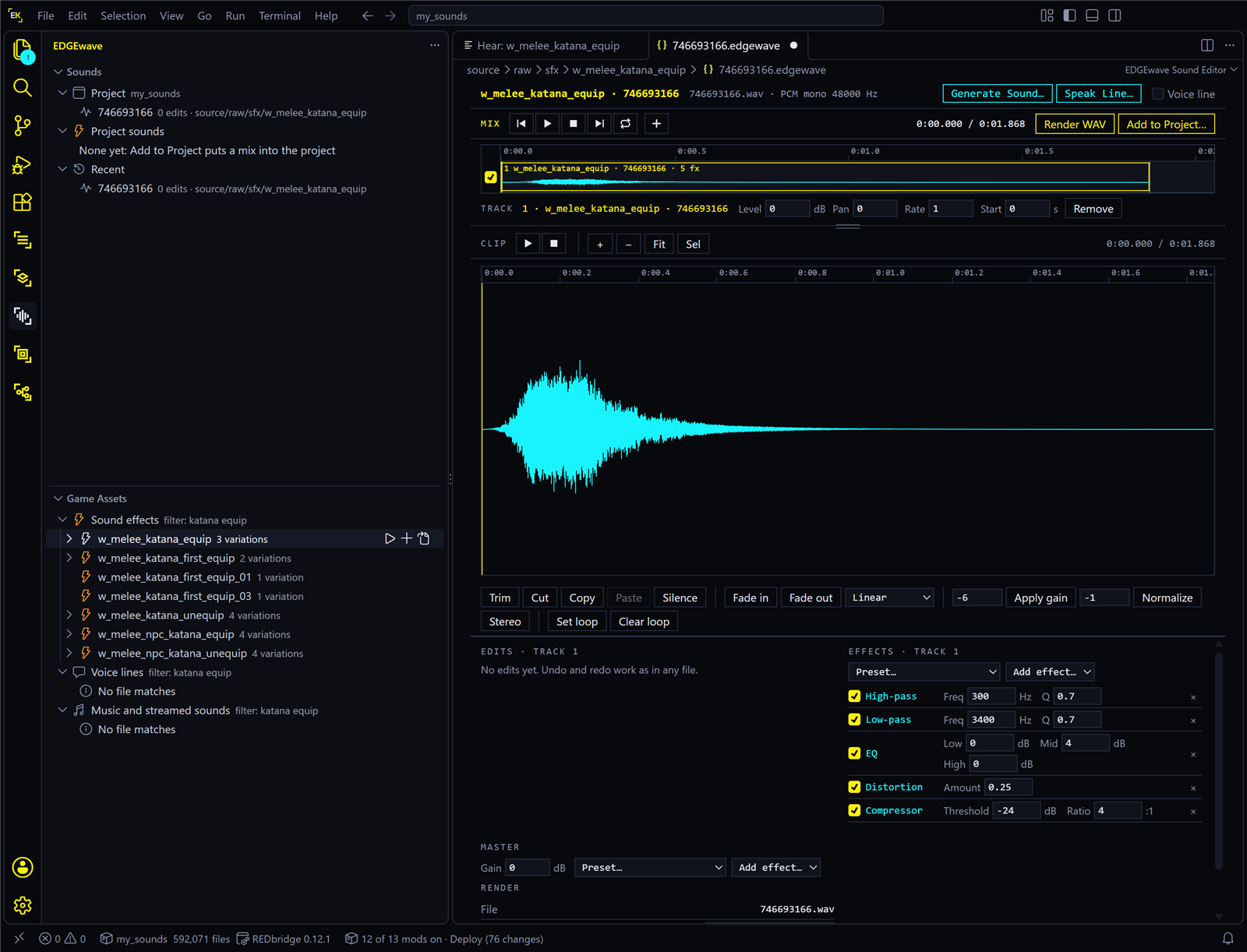
- Below the waveform are three panes: Edits, Effects and Master. In Effects, open the menu that reads Preset… and choose Radio.
- Press Space.
| What you should see | |
|---|---|
| The Effects pane | Five effects, top to bottom: High-pass, Low-pass, EQ, Distortion, Compressor. Together they make the Radio sound |
| What you hear | The same draw, thin and crunchy, as if from a small speaker |
| The tab | A dot appears on it, VS Code’s sign for unsaved changes |
Press Ctrl+S to save. Changed your mind? Ctrl+Z undoes and Ctrl+Y redoes, and the × beside an effect removes it. Keep the radio for now: it is what you listen for in the game.
5. Add it to the project
- Press Add to Project…, at the right end of the Mix bar.
- A list opens, titled “Add to Project: what should the mix replace?”. Under the heading
Track 1 · w_melee_katana_equip · 746693166, choose Override sound 746693166.
| What you should see | |
|---|---|
| A message | “Sound 746693166 now overrides the game’s, in …”, naming the files it wrote, and how to hear it. It has the buttons Pack and Install and Pack |
| REDcode’s Project view | Under Archive, a sound pack (sfx_container_<number>.opuspak) and the sound index (sfx_container.opusinfo) |
What happened: EDGEwave rendered your radio version, and REDcode wrote it into the project in the game’s own sound format. The other rows in the list are other ways into the game: Into the game explains them.
6. Into the game
- Make sure the game is closed. Press Pack and Install in the message. If the message is gone, press Pack and Install in REDcode’s Project view, the rocket in the view’s title bar.
- Press Run Game, the play triangle beside it, and load a save.
- Put a katana in V’s hands, then put it away and draw it again, several times.
No katana? With REDnode 0.49.5 or later in the game: press F10, click the REDNODE tab, switch on Console, type this and press Enter. Then equip the katana from the inventory.
addItem("Items.Preset_Katana_Default")
| What you should see | |
|---|---|
| After step 1 | REDcode packs the project and installs it. The game folder’s archive\pc\mod now has my_sounds.archive |
| After step 3 | On some draws, your radio version in place of the clean one |
The Console line was not part of EDGEwave’s test, which used a katana V already had. The very first time V takes out a weapon that is new to them, the game may play a longer flourish with its own sound: put the katana away and draw it again.
What to listen for
| Listen for | You should hear |
|---|---|
| The draw, over ten or so tries | Your radio version about one time in three. You replaced one of the event’s recordings, and the game picks one each time |
| Everything else | Unchanged: putting the katana away, swings and hits are other events |
| If | Do this |
|---|---|
| Every draw sounds like the original | Check that you started the game after Pack and Install: the game reads its sounds once, when it starts. Then see I hear no change |
| The list in step 5 has no Override sound row | The sound on the track is not a game sound effect. Open the variation from Game Assets again, as in step 3 |
| “Open a REDcode project first” | REDcode has no project open. Open the my_sounds folder in VS Code |
Put it back
Your mod is one small set of files, so taking it out is simple. Close the game. In REDcode’s Project view, open the ... menu and choose Uninstall. The katana sounds as it did the next time the game starts. Your project stays as it is, and Pack and Install puts the mod back. More: Uninstall.
Try next
- Every draw, not one in three. Open Variation 2 and Variation 3 the same way, give each the Radio preset and choose its Override sound. Or replace everything the event plays in one go, with Replace the event …, every variation, with REDmod. That route needs one REDcode setting switched on first: see Replace everything an event plays.
- Another effect. Try PA speaker or Muffled through a wall, or change one effect’s values. See Effects and presets.
- Layer a second sound on it. The + in the Mix bar adds another game sound or a file of your own as a second track. See Tracks.
- Silence a sound. Silence the event makes the game play nothing for it. On this same katana event that was heard, as silence, in EDGEwave’s test.
- Find out what a sound is called. Don’t know which event you hear in the game? REDnode’s Sound Tracer lists every event as the game plays it.
- A sound the game doesn’t have. Voice tools make one from a description, with an ElevenLabs account.