Pictures
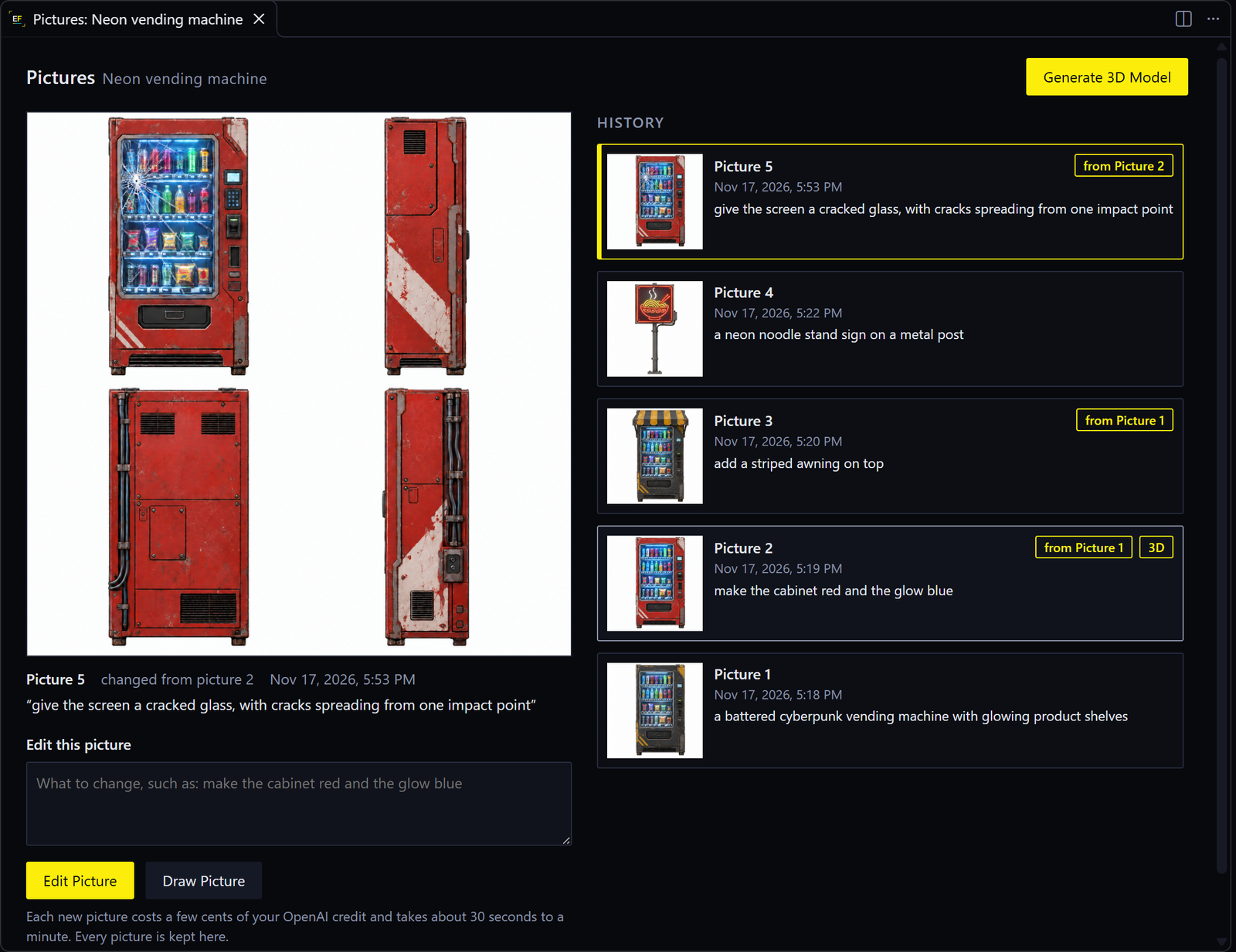
Making a prop from words starts with a picture. OpenAI’s GPT Image draws your object from four sides: front, left, back and right. You change that picture by words until it’s right. Only then is it made 3D, from all four views.
Why a picture first: a picture costs a few cents and half a minute, and a 3D model costs about 60 Tripo credits and four minutes. And a model made from four views is true to every side, where a model made from words alone has a guessed back.
| On this page | |
|---|---|
| Generate from Words | The first picture |
| The Pictures tab | What’s on it |
| Change a picture | Edit Picture |
| Start again | Draw Picture |
| Words that work | Examples |
| Without an OpenAI key | Straight to 3D |
Generate from Words
- On the Desk, press Generate from Words….
- Describe one object, such as
a rusty oil drum with a hazard sticker. - Choose Draw it first.
About 30 seconds later the picture opens in its own Pictures tab, and a new line for it appears on the Desk. EDGEfab adds a short brief to your words, so the object is drawn for a game prop: flat panels, crisp details, a plain background.
The first time, EDGEfab asks for your OpenAI key: see Your keys.
The Pictures tab
| Part | What it is |
|---|---|
| The big picture | The one in view: the four sides in one image |
| Under it | Its number, the date, the words that made it, and “changed from picture 2” if it came from another |
| Edit this picture | The box for your words, with Edit Picture and Draw Picture |
| Generate 3D Model | At the top. It uses the picture in view: see 3D models |
| History | Every picture of this prop, newest first. Click one to view it |
Chips on a history card:
| Chip | Means |
|---|---|
| from Picture 2 | This picture is picture 2, changed by its words |
| 3D | The 3D model on the Desk was made from this picture |
Every picture is kept. The tab comes back where you left it after the window reloads. To open it again later, click the prop on the Desk while it is still a picture, or right-click it and choose Open the Pictures.
Change a picture
- Click the picture you want to change, in the history. It need not be the newest.
-
Type only what should change:
make the cabinet red and the glow blue - Press Edit Picture, or
Ctrl+Enter.
That picture goes to GPT Image with your words, and comes back changed as they say, with the rest kept. It becomes a new picture: the one you started from stays as it was. A spinner shows while it works, with Cancel beside it.
Each change costs a few cents and takes 30 seconds to a minute.
Start again
Draw Picture draws a new picture from the words in the box alone, not from the picture in view. Use it when the object is wrong altogether. Write the whole object again, as you did the first time.
| Button | Sends | Write |
|---|---|---|
| Edit Picture | The picture in view, with your words | Only the change |
| Draw Picture | Your words alone | The whole object |
Words that work
| For | Try |
|---|---|
| A first picture | a battered cyberpunk vending machine with glowing product shelves and a cracked screen |
a rusty blue oil drum with a hazard sticker |
|
a neon noodle stand sign on a metal post |
|
| A change of color | make the cabinet red and the glow blue |
| Adding something | add a striped awning on top |
| Wear and damage | give the screen a cracked glass, with cracks spreading from one impact point |
| Taking something off | remove the stickers from the sides |
| Tips | |
|---|---|
| One object | A scene, or two things side by side, makes a poor model |
| Say what is on each side | “a keypad on the right side, cables down the back” |
| Lights | Say what glows and in what color. You can make it really glow later |
| Small steps | One or two changes at a time keep the rest steadier |
| Check all four sides | The model follows each view closely. A side that is wrong in the picture is wrong in the model |
Without an OpenAI key
After Generate from Words…, choose Straight to 3D instead of Draw it first. Tripo makes the model from your words alone. It is less true to them, and its back and sides are Tripo’s guesses. There is no picture to change first.
Next: 3D models.