Playing in the game
EDGE Director is EDGEdir’s app in the game. It opens the scenes on your Desk and plays them on real people: it spawns each actor, starts them on their first animation, and moves each to their next one on time. It works with VS Code open or closed.
Only the first steps have run in the game so far. On 2026-11-20 EDGE Director started in the game, listed the Desk, and played a scene of two people through, on time and on the right sides. Everything else on this page is built and was run against a stand-in for the game: where it says what you will see in the game, read it as what is meant to happen. The pictures of the window here were taken outside the game.
| On this page | |
|---|---|
| Open the window | |
| Open a scene | The strip, and where it plays |
| Play, Stop, Start Again | And the playhead and Loop |
| The cast | Who is in the game, and Go There |
| Play in Game, from VS Code | |
| What the game will not match | Read this before judging a scene |
Open the window
EDGE Director must be in the game and switched on: see Install and set up. Load a save, press F10 for REDnode’s overlay, and open EDGE Director from the launcher.
It opens on Scenes: the scenes on your Desk, the last changed first. A scene that is in the game right now is marked In the game.
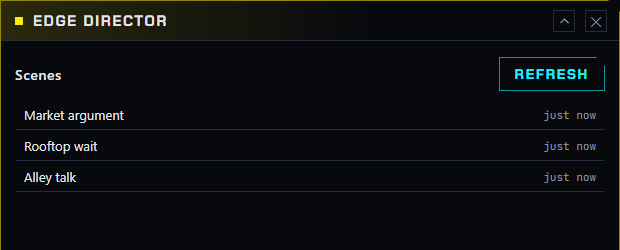
The window takes the mouse only while REDnode’s overlay is in its interactive mode (F10), as every REDnode window does.
Open a scene
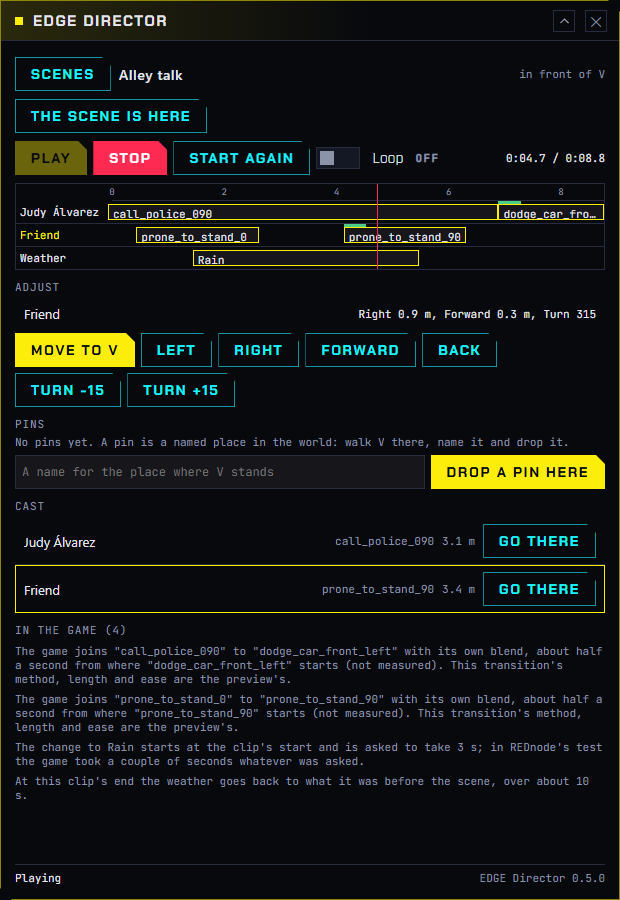
Click a scene. The window shows:
| Part | Shows |
|---|---|
| The header | The scene’s name and where it plays: “in front of V”, “on” a set, or “at” a place or a pin |
| The transport | Play, Stop, Start Again, Loop, and the time |
| The strip | One lane for each track with its clips’ names, and the playhead. Clips the game plays are lit. A thin green bar over a join is a transition, which is the preview’s |
| Adjust, Pins | Adjusting and pins |
| Cast | Who is in the game |
| In the game | What the game will not play as the preview shows |
| The line at the bottom | What is happening now, and anything that went wrong, in words |
A scene that cannot play says why in a red box: for instance, that no actor has a clip the game can play, or that its set was not found.
When you save a scene in VS Code, the window shows the change within a few seconds.
Play, Stop, Start Again
| Button | Does |
|---|---|
| Play | Plays the scene from the playhead’s moment. The line reads what it is doing: writing the animations, spawning the people, starting the cast, playing |
| Pause | Holds the scene: everybody stands still mid-movement and the playhead stops. The button reads Resume, which goes on from there. Untested in the game |
| Stop | Removes the people, the set and the scene’s pins, and gives the weather back |
| Start Again | Sends the cast back to their first clips. Nobody is removed or spawned again, so it is quick |
| Loop | The scene starts again by itself at its end |
| The playhead | Drag it on the strip’s ruler. While the scene plays, the cast jumps to that moment and plays on. With nothing playing, the next Play starts there |
The first play of a scene takes a few seconds longer: each actor’s animations are written into a form the game plays, once. After that only actors whose clips changed are written again.
An actor holds the last pose of their last clip until Stop. This is new and untested in the game; before it, the last clip played again and again.
The bar under the strip makes the strip taller or shorter, and the lanes scroll inside it.
Where the people stand: a scene with no place of its own plays in front of V, 3 m ahead, laid out as V sees it at the moment of Play. To keep it at one spot, see The scene’s place.
The cast
While a scene is in the game, Cast lists each actor with the clip they play now and their distance from V.
| Click an actor | They are chosen: a pin with their name stands over them in the world, their lane’s name lights up, and Adjust works on them |
| Go There | Puts V in front of that actor, facing them |
Play in Game, from VS Code
The scene editor’s toolbar has Play in Game. It plays the scene through EDGE Director, which must be running in the game.
| Before it plays | EDGEdir lists what the game will not match and asks Play Anyway. It asks again only when the list changes |
| While it plays | The button reads Stop in Game, the line beside it says how the play goes, and the editor’s playhead runs with the game |
| Unsaved changes | They play too: VS Code sends the scene as it is in the editor |
| EDGE Director’s window | Shows the same play, marked “from VS Code” |
| When EDGE Director is missing or too old | EDGEdir says so and offers its download. It never copies anything into the game folder itself |
EDGEdir and EDGE Director talk through a folder in your own Windows profile (%LOCALAPPDATA%\EDGEdir\play). No network port is opened; only your own programs can write there.
What the game will not match
The preview and the game are two different players. Today the game differs in these ways. EDGEdir says each one where it applies: in the editor’s inspector under In the game, in the list before Play in Game, and in EDGE Director’s window.
| In the preview | In the game |
|---|---|
| A transition blends two clips by its method, over its length | The game blends into the next clip by itself, from where that clip starts. The transition’s settings are the preview’s |
| Two clips with no transition cut | The game still blends, for about half a second |
| In: a clip starts inside its animation | The clip starts from the animation’s beginning |
| Speed | The clip plays at normal speed |
| A clip trimmed short, or looped | Works: EDGE Director moves the actor on, or starts the clip again, on time |
| An animation made in EDGEfab | Left out; the clip before it goes on |
| V acts | V’s track is left out |
| A walk moves along | Nobody moves from their mark: an animation’s own movement is not applied |
| Muted tracks | Left out |
Still to be seen in the first tests in the game: whether actors stand and face as their marks say, whether a person shows a stiff “T pose” for a moment when first spawned (EDGE Director starts everybody once before the scene to get past it), and how the game’s blend looks beside the preview’s.