Into the game
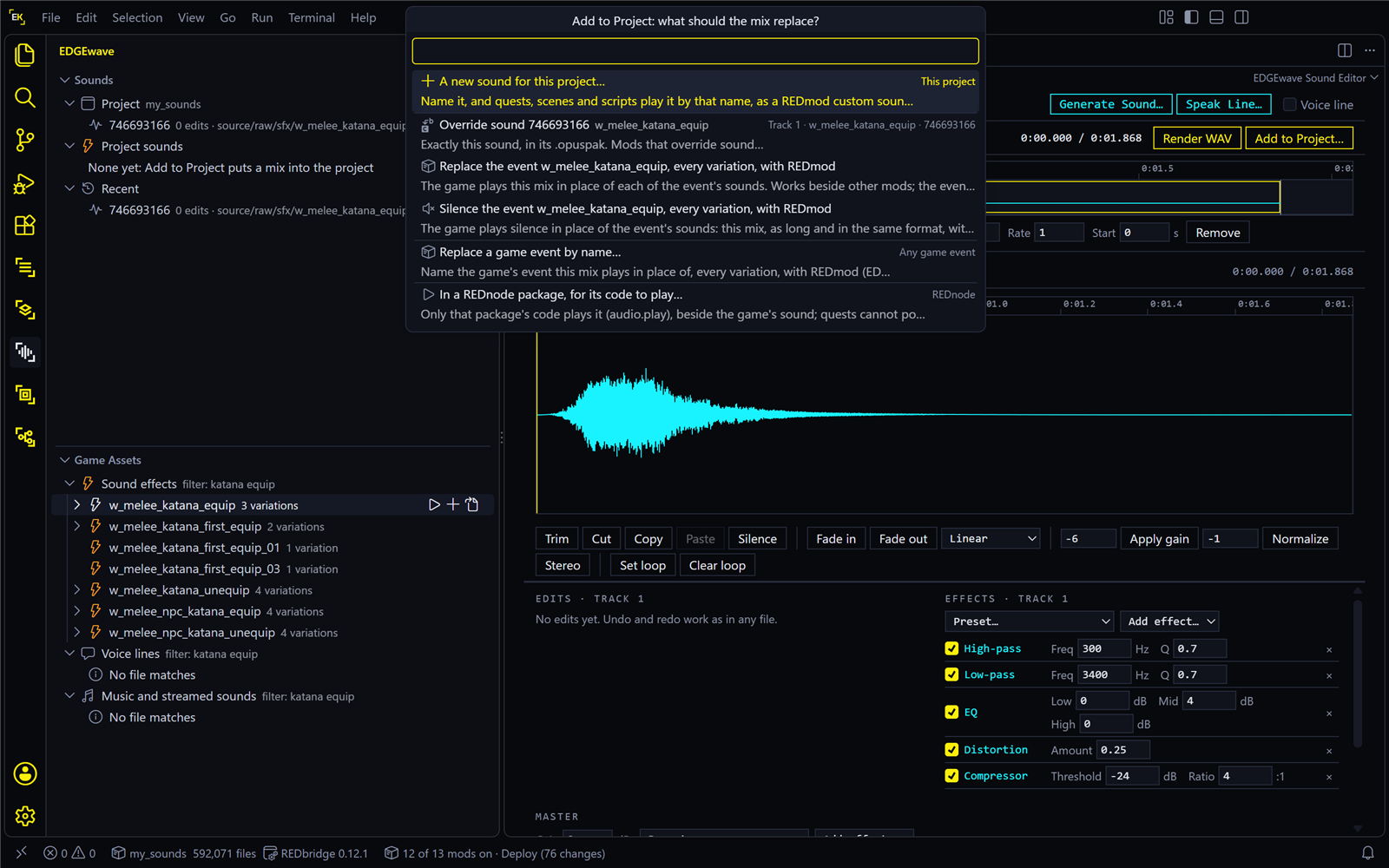
Add to Project… puts your mix into your mod project, in a form the game loads. REDcode then packs the project and installs it, and you hear the result the next time the game starts.
The button is at the right end of the editor’s Mix bar. Up to EDGEwave 0.1.0 it was called Into the Game….
| On this page | |
|---|---|
| Which should I pick? | The six routes, in one table |
| What goes in, and what it replaces | Two separate choices |
| Replace one sound | An override |
| Replace everything an event plays | Through REDmod, with the setting it needs |
| Silence an event | |
| A new sound for this project | For quests, scenes and scripts |
| A sound for a REDnode package | For a mod’s own code |
| Hear it in the game | Install, then start the game |
| The REDmod setting | What it changes for the whole project |
| Voice lines, Other sound mods | Two limits |
| What each route writes, Take it out again | |
| What was heard in the game | The test record |
Which should I pick?
The game plays sounds by event, such as w_melee_katana_equip. An event can have several recordings, its variations, each known by a number, its hash. So “replace a sound” can mean one recording, or everything the event plays.
| You want to | Pick | Good to know |
|---|---|---|
| Change one recording of a sound effect | Override sound <hash> |
The simplest: nothing to switch on. If the event has other variations, the game still plays those some of the time. Doesn’t combine with other mods that override sounds |
| Change everything an event plays | Replace the event <event>, every variation, with REDmod |
One sound for every variation. Needs the REDmod setting. Works beside other mods |
| Make a sound go away | Silence the event <event>, every variation, with REDmod |
The same, with silence |
| Replace an event whose name you know, without having its sound open | Replace a game event by name… | As Replace, for a name you type |
| Add a sound that replaces nothing, for a quest, a scene or a script to play | A new sound for this project… | Gets a name of its own. EDGEquest offers it in its pickers |
| Give a REDnode mod a sound its code plays | In a REDnode package, for its code to play… | No REDmod needed, and it takes voice lines too |
Not sure? To change a game sound, start with Override sound, as the tutorial does. Move to Replace the event when you want every variation, or when your mod must work beside other sound mods.
What goes in, and what it replaces
Add to Project makes two separate choices.
| Choice | Decided by |
|---|---|
| What goes in | The mix of the ticked tracks, whichever they are |
| What it replaces | The row you pick in the list |
The list offers every game sound effect that is on a track, ticked or not. So a game sound’s track does two jobs: ticked, it is heard in the mix. Ticked or not, it names a sound your mix can replace.
That makes a straight swap easy. Say track 1 is a sound file of your own, and track 2 is the katana sound from the game:
| Track 1 (your file) | Track 2 (the game sound) | With Override sound under track 2, the game plays |
|---|---|---|
| ☑ | ☐ | Your file alone, in place of the katana sound |
| ☑ | ☑ | Both mixed: the katana with your file layered on |
| ☐ | ☑ | The katana, as you edited it |
The list, top to bottom:
- This project: A new sound for this project…, always first.
- One group for each game sound effect on a ticked track, in lane order, headed
Track 2 · <event> · <hash>. Each group has Override sound, Replace the event and Silence the event. - Any game event: Replace a game event by name….
- Groups for game sounds on unticked tracks, marked not in the mix.
- REDnode: In a REDnode package, for its code to play….
The route you used last on this sound is marked last time. If no track holds a game sound effect, groups 2 and 4 are missing. To override a game sound with a mix made only from your own files, add the game sound with Add Sound, untick its lane, then open the list again.
Replace one sound
- Open the recording you want to change (Find and play sounds) and edit it, or build a mix with that game sound on a track.
- Press Add to Project… and choose Override sound
<hash>under that track.
| What you should see | |
|---|---|
| A message | “Sound <hash> now overrides the game’s, in …”, with Pack and Install and Pack |
| REDcode’s Project view | Under Archive, a sound pack (sfx_container_<number>.opuspak) and the sound index (sfx_container.opusinfo) |
Then hear it in the game. The tutorial walks through this route.
EDGEwave writes the override with the same channels, mono or stereo, as the sound it replaces. You can override several sounds in one project: each adds to the same index.
Replace everything an event plays
This route uses REDmod, CD PROJEKT RED’s own mod format, which can give an event a new sound. The game then plays your mix whenever it asks for that event, whichever variation it would have picked.
- Switch on REDcode’s setting
redcode.pack.redmod: open VS Code’s settings (Ctrl+,), search forredcode.pack.redmodand tick it. Read The REDmod setting first if the project also holds other work. - With one of the event’s sounds on a track, press Add to Project… and choose Replace the event
<event>, every variation, with REDmod. - A second list asks how the game should play it. Pick a type:
| Type | The sound |
|---|---|
| 2D | Plays the same wherever V is: no position, no fading with distance |
| Occlusion | Fades at a medium distance, and is muffled by walls |
| Low occlusion | Carries far and is hardly muffled, such as a voice-over or a quest sound |
| Room | Fades quickly: heard across a room |
| Street | Heard down a street |
| City | Carries furthest, for city sounds |
| Radio | For a broadcast channel |
| UI | Menu sounds. Untested |
| What you should see | |
|---|---|
| A message | “REDmod will play source\customSounds\<event>.wav for <event>, as <type> …”, with Pack and Install and Pack. If the setting from step 1 is off, the message says so and has an Open Setting button |
| In the project | source\customSounds\<event>.wav, and source\resources\info.json, which REDcode’s Project view shows under Resources |
Good to know:
- Which type? There is no rule written down. 2D is the safe first try: if you hear it at all, the rest works, and you can pick a type with position next. In EDGEwave’s test, a vending machine sound was replaced as Room and played.
- The event’s own behaviour is dropped. The game normally shapes an event’s sound itself, for example in slow motion. A replaced event plays your WAV as it is.
- It asks before overwriting. If the project already has a sound for that event that this sound document didn’t write, EDGEwave asks first.
- Volume. Set it in the mix, with the track’s Level or the Master’s Gain. The
gainnumber ininfo.jsondid not change the volume in testing.
Silence an event
Choose Silence the event <event>, every variation, with REDmod, then a type, as for a replacement. EDGEwave writes your mix’s length as pure silence, and the game plays that.
Pick an event that sounds on its own, such as a weapon being drawn. One action can play several events layered together: a can dropping from a vending machine does. Silence one of them and the others still sound.
A new sound for this project
A sound of your own, under a name of its own. It replaces nothing: a quest, a scene or a script plays it by that name.
- Press Add to Project… and choose A new sound for this project….
- Name it. EDGEwave offers
edgewave_<the sound's name>. Use letters, digits and_. The name of one of the game’s own events is refused, because your sound would replace that event. - Choose how it plays: A sound effect, heard from where it plays (it has a position and fades with distance), The same everywhere (2D) (music, a phone or interface sound), or Another of REDmod’s types… for the list above.
| What you should see | |
|---|---|
| A message | ”<name> is a sound in the project now: a quest, scene or script plays it by that name …”, with Copy Name and Pack and Install |
| EDGEwave’s Sounds view | The sound under Project sounds, with its kind and length |
A new sound is a REDmod custom sound too, so it needs the REDmod setting, and the game reads it only when it starts. To play it from a quest, see EDGEquest’s Music and sound.
A sound played as 2D follows the game’s sound effects volume slider, even if it is music: REDmod has no music type. A sound with a position plays from V when a quest plays it. In one test it seemed to come slightly from one side. If that bothers you, use 2D.
A sound for a REDnode package
A REDnode package is a mod that runs in the game through REDnode. This route gives a package a sound that only its own code plays, beside the game’s sound. It needs no REDmod and no game format, so it also takes a voice line.
- Press Add to Project… and choose In a REDnode package, for its code to play….
- Pick a package EDGEwave found, or make one: New package in the project… (it ships with your mod) or New package in the game folder… (for trying a sound out; offered when REDnode is installed in the game). A new package needs an id: small letters, digits and dashes.
- Name the sound. The package’s code plays it by this name.
- Pick the volume slider it follows: Sound effects, Dialogue or Music.
| What you should see | |
|---|---|
| A message | ”<name> is in <package> …”, with Copy Code (the line of code that plays it), Open Manifest, and for a package in the project Pack and Install |
| In the package’s folder | sounds\<name>.wav, and the sound listed in the package’s rednode-app.json |
| A new package | Also a small mod.mjs that plays the sound once when the package starts, for you to build on |
A package in the game folder starts while the game runs, with no restart: once a save is loaded it plays the sound once. Change the mix and add it again to the same package, and the package restarts with the new sound. That was heard in the game. A package made in the project has passed only as far as its files: that REDnode starts it after Pack and Install, while the game runs, is not confirmed.
Packages in the game folder are in red4ext\plugins\REDnode\apps\<id>. Delete the folder when you are done trying. How a package plays sounds: Your own audio files.
Hear it in the game
The game reads its sounds once, when it starts. So after Add to Project:
- Close the game.
- Press Pack and Install, in EDGEwave’s message or in REDcode’s Project view (the rocket). See Pack, install and run.
- Press Run Game, the play triangle in REDcode’s Project view.
- Load a save and make the sound happen.
| Route | To hear it | What to expect |
|---|---|---|
| Override | Steps 1 to 4 | Your version, on the draws where the game picks the recording you replaced |
| Replace, Silence, a new sound | Steps 1 to 4, with the REDmod setting on before you pack, and the game started with Run Game | Your version every time. Started from Steam, GOG or a shortcut, the game ignores REDmods, and you hear the original |
| A REDnode package in the game folder | Nothing more: REDnode starts it while the game runs | The sound once, when a save is loaded |
Don’t swap a sound mod into a running game. EDGEwave’s message warns against it: with older tools, a sound archive swapped in crashed the game seconds later. REDcode’s Pack and Play now swaps through REDnode, which was built to do it safely, but that has not been tested on the current game version. Install and restart.
If REDmod refuses a sound, its log says why: tools\redmod\bin\REDmodLog.txt in the game folder. No change at all? See Troubleshooting.
The REDmod setting
redcode.pack.redmod is a REDcode setting, off by default. Three routes need it on: Replace the event, Silence the event and A new sound for this project (and Replace a game event by name, which is a Replace). The override and the REDnode package don’t.
| With the setting on | |
|---|---|
| The whole project packs as a REDmod | It installs into the game’s mods folder instead of archive\pc\mod |
| The game must start for REDmods | REDcode’s Run Game does that by itself. Started any other way, the game ignores the mod |
| It is a setting, not a button | It stays on for the next pack too. If you set it under Workspace in VS Code’s settings, it applies to this project only |
A project shared with other work. The setting covers everything in the project. If the same project holds EDGEmat materials, they travel in the same REDmod and show only when you start the game with Run Game: see If REDmod packing is on. To keep the setting off for your clothes, keep sounds and materials in two projects.
An override and a REDmod sound in one project. EDGEwave’s tests packed overrides with the setting off. An override packed inside a REDmod has not been tested. And if the same event has both an override and a REDmod replacement, the REDmod sound plays.
More about the format: Packing as a REDmod.
Voice lines
You can open, edit and make voice lines, but EDGEwave can’t yet put one back into the game as dialogue. The game wants dialogue in a format, .wem, that only Audiokinetic’s Wwise tool makes, and EDGEwave can’t include Wwise. When a voice line is in your mix, Add to Project says so.
What you can do today with a line you made:
- play it in place of a sound event, with Replace a game event by name…;
- make it a new sound for this project, and let a quest or a script play it;
- give it to a REDnode package.
Using your own Wwise install for real dialogue is being worked on.
Other sound mods
| Route | Beside other mods |
|---|---|
| Override | No. Every mod made this way carries its own copy of the game’s one sound index, and the game uses one: the last mod loaded wins. Two such mods can’t both work, whoever made them |
| Replace, Silence, a new sound | Yes. Each REDmod names its own events |
| REDnode package | Yes. Each package plays its own sounds |
If you plan to share a mod that changes game sounds, prefer the REDmod routes.
What each route writes
All paths are inside your project. Nothing is written to the game until you install.
| Route | Writes |
|---|---|
| Override | <hash>.wav beside the sound document. Then, through REDcode, the changed sound pack and a new sfx_container.opusinfo under source\archive |
| Replace, Silence, by name | source\customSounds\<event>.wav, and an entry under customSounds in source\resources\info.json |
| A new sound | source\customSounds\<name>.wav, and its entry in info.json |
| REDnode package, in the project | source\resources\red4ext\plugins\REDnode\apps\<id>\sounds\<name>.wav, and the package’s rednode-app.json |
Every WAV is written at 48 kHz, the rate the game uses. The sound document remembers the route, which is how last time is marked.
Take it out again
Out of the game. Close the game. In REDcode’s Project view, open the ... menu and choose Uninstall. Your project is untouched, and Pack and Install puts the mod back. See Uninstall.
Out of the project, so the next pack no longer has it:
| What | Remove |
|---|---|
| A replaced or silenced event, or a new sound | Its WAV in source\customSounds, and its entry in source\resources\info.json |
| A REDnode sound | The package’s folder, or the sound’s file and its entry in rednode-app.json |
| An override | The sound files under Archive: the .opuspak files and sfx_container.opusinfo. That removes every override in the project, so add again the ones you want to keep. This step is not part of EDGEwave’s tests |
Then Pack and Install again.
What was heard in the game
From EDGEwave’s test record, on the developer’s PC:
| What | Result |
|---|---|
| An override of the katana’s draw sound, also from a mix where the game sound was on a later track or unticked | Heard |
| An event replaced through REDmod (a vending machine’s can, as Room) | Heard |
| An event silenced (the katana’s draw) | Silent, as it should be |
| A new named sound, played by an EDGEquest quest from a beat and from a scene, as 2D and with a position | Heard |
| A sound in a REDnode package made in the game folder, on the Dialogue slider | Heard |
| A REDnode package made in the project, started after Pack and Install while the game runs | Not confirmed |
| An override packed with the REDmod setting on | Not tested |
| A sound mod swapped into the running game | Not tested on the current game version |
| REDmod sounds in formats other than EDGEwave’s own 48 kHz, 16-bit WAV | Not tested, and EDGEwave writes no other |