EDGEhack
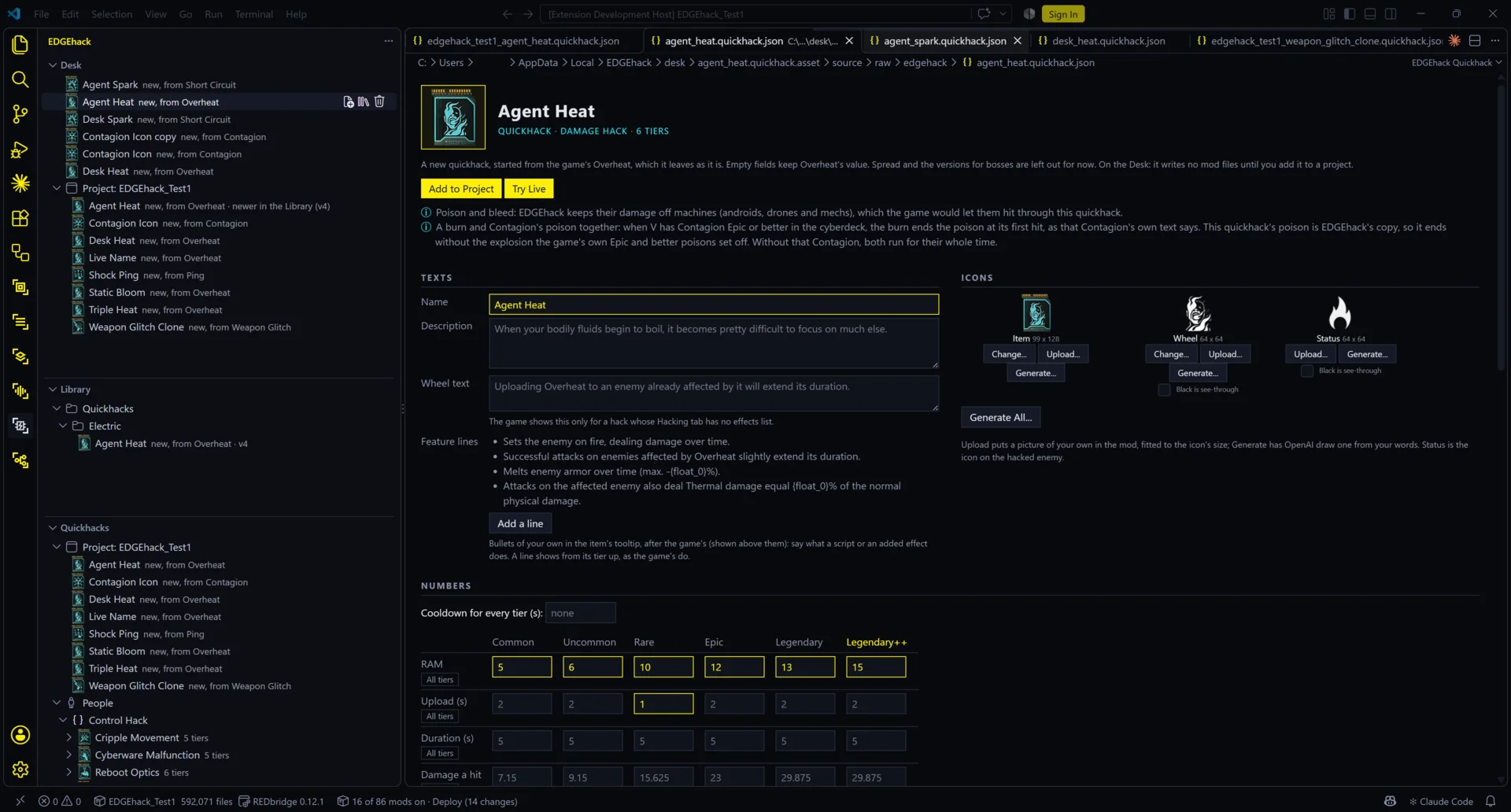
EDGEhack is a quickhack editor for Cyberpunk 2077. It runs inside VS Code, beside REDcode. A quickhack is one of the abilities V uploads onto an enemy through the scanner, such as Overheat or Contagion. With EDGEhack you open any of the game’s quickhacks and read it in plain words: what each tier costs, how long it takes, what it does. You can change those numbers, its name and its icons. You can also make a new quickhack of your own that sits beside the game’s, try it in the running game, and save it as a mod.
You don’t write code for any of this. One optional feature, scripts, uses a few lines of JavaScript, and an assistant such as Claude can write those for you.
New here? Read this page, then Install and set up. Then do the two walk-throughs in order: Change a game quickhack (five minutes) and Your first quickhack (about twenty). The other pages are for looking things up.
| On this page | |
|---|---|
| What it’s for | Why a quickhack is hard to change by hand |
| What it can do | The features, each with its page |
| Words you’ll meet | Tier, RAM, record, project and the rest |
| Why you might want it | |
| How it fits into EDGE | What it needs from the other tools |
| Status | The current release, and what was tested how |
| In this section | Every page |
What it’s for
In the game’s data, a quickhack is not one thing. It is many linked entries in TweakDB, the game’s database of items and stats. The game calls each entry a record. Overheat alone has one record for each of its six tiers, plus records for what it does when it lands, what it costs, how long it lasts and which icons it shows.
Changing a quickhack by hand means finding the right records, working out how the game adds their numbers up, and writing a file that changes the right ones.
EDGEhack reads all of that from your own game and shows it as one page. You change what you want on the page. EDGEhack writes the mod’s files into your project, the folder REDcode keeps your mod in, and REDcode packs them into a mod.
What it can do
| You can | Where |
|---|---|
| Read any quickhack: every tier’s name, icons, RAM, upload time, damage, duration and effects, in plain words | Install and set up |
| Change a game quickhack: its texts, icons and numbers, for one tier or all of them | Change a game quickhack |
| Make a new quickhack from one of the game’s, with Clone and Modify. The game’s own stays as it is | Your first quickhack |
| Add effects: another quickhack’s effect, any of the game’s status effects, or one EDGEhack builds for you | The editor |
| Decide how players get it: a new quickhack is sold and crafted like the game quickhack you cloned it from, tier for tier | The editor |
| Use icons of your own: upload pictures, or have OpenAI draw them from your words (needs your own paid OpenAI key) | The editor |
| Add lines to the tooltip that tell players what your quickhack does | The editor |
| Give it logic of its own with a script. Optional, and Claude can write it for you | Scripts |
| See a change in the running game in seconds, with Try Live | Try Live and Pack and Play |
| Work outside a project on the Desk, and keep quickhacks for good in the EDGE Library | The Desk and the Library |
| Ask an assistant to do any of this: Claude Code today | Assistants |
Quickhacks used on devices (cameras, turrets) and on vehicles can be read but not changed yet.
Words you’ll meet
| Word | Means |
|---|---|
| Quickhack | An ability V uploads onto a target through the scanner, such as Overheat. In the game it is an item V slots into the cyberdeck |
| Tier | One strength of a quickhack. The game’s names for them are Common, Uncommon, Rare, Epic, Legendary and Legendary++. Each tier is its own item. Overheat has all six; some quickhacks have fewer |
| Family | One quickhack with all its tiers. The Quickhacks view lists families: “Overheat, 6 tiers” |
| RAM | What a quickhack costs V to use. V’s cyberdeck has a limited amount |
| Upload | The time a quickhack takes to reach its target, in seconds |
| Cooldown | The time before V can use the same quickhack again |
| Status effect | Something the game puts on a character for a while: burning, poisoned, blinded. Most quickhacks work by adding one |
| TweakDB | The game’s database of items and stats |
| Record | One entry in TweakDB. Every item, effect and price is a record with an id, such as Items.OverheatLvl2Program (Overheat’s Rare tier) |
| Project | Your mod project: a folder REDcode makes for your mod’s files. It is the same kind of project WolvenKit uses, so these pages also say WolvenKit project |
| Document | The small file EDGEhack saves for one quickhack you changed or made, <name>.quickhack.json. Its page in VS Code is the editor |
| Pack | Turn a project into the mod’s files. REDcode does it |
| Framework | A mod that other mods need in order to work. EDGEhack’s mods need TweakXL, and often ArchiveXL and redscript |
| TweakXL | The framework that changes TweakDB from small text files (YAML). Every EDGEhack mod is made of these |
| ArchiveXL | The framework that lets a mod add new texts and icons |
| redscript | The framework for script mods. A new quickhack needs one small script, which EDGEhack writes for you |
| The Desk | EDGEhack’s scratch area for quickhacks you are working on, before they go into a project |
| The Library | The EDGE Library: one folder of your own, shared by the EDGE tools, where you keep finished work to use in any mod |
More terms are in the wiki’s glossary.
Why you might want it
| If you… | EDGEhack gives you |
|---|---|
| Think a quickhack costs too much or hits too weakly | Its numbers on one page. Type the number you want and try it in the game |
| Want a quickhack the game doesn’t have | Clone and Modify: a new quickhack with its own name, icons and effects, which vendors sell beside the game’s |
| Want Overheat to poison as well as burn | Add Effect: borrow Contagion’s poison, or any other effect in the game |
| Edit TweakDB by hand today | The same records, found for you, and plain TweakXL files in your project that you can read and change |
| Would rather ask than click | Claude Code can find, make and change quickhacks with you: Assistants |
Your numbers survive game patches. EDGEhack remembers the number you asked for, not how far it was from the game’s. If a patch changes the game’s number, save the quickhack again and it still ends up at yours: see After a game patch.
How it fits into EDGE
| Part | Role for EDGEhack |
|---|---|
| REDcode | Needed. It reads the game’s files, holds your project, and packs and installs the mod. EDGEhack’s Pack and Play button is REDcode’s |
| REDbridge | Reads the game’s files for REDcode. REDcode installs it for you |
| EDGEdeck | Recommended. The mod manager: it installs the frameworks in one go, and your mod is installed through it |
| REDnode | Optional, in the game. Needed for Try Live, for scripts, and for the Console line that gives V a quickhack while testing |
| Claude and other assistants | EDGEhack’s MCP server lets an AI assistant work with quickhacks. You connect it yourself: EDGEchat does not include it yet |
| EDGEkit | The EDGEkit app has EDGEhack built in |
EDGEhack ships no game data. It reads the quickhacks from your own game each time VS Code starts.
Status
A preview, released. The latest is EDGEhack 0.1.2 (2026-11-11), for game 2.5, on Nexus Mods, Open VSX and GitHub. Windows only.
It is not on the VS Code Marketplace yet. The Marketplace’s automatic check rejected it without giving a reason, and its support has been asked why. Until then, install it from the download: see Install and set up.
| Works, and seen in the game | Changing a game quickhack. New quickhacks. Added and built effects. Selling and crafting (Get it). Uploaded and generated icons. Feature lines. Scripts. Try Live |
| Works, tested in VS Code | Reading quickhacks, the Desk and the EDGE Library, which don’t change the game. Claude Code finding, making, changing and packing quickhacks. Its Try Live tool has not been tested with Claude Code yet |
| Not there yet | Changing device and vehicle quickhacks. On a new quickhack: spreading to nearby enemies, and separate numbers against bosses. Names and icons in Try Live (they need Pack and Play) |
| Coming | REDagent, the assistant inside the game, making quickhacks while you play. It is built and passed its test in the game, and waits for the next REDnode and REDagent releases |
Each version’s changes are in EDGEhack’s changelog.
In this section
| Page | What it covers |
|---|---|
| Install and set up | What you need, installing it, its three views, updating and uninstalling |
| Change a game quickhack | A five-minute walk-through: make Overheat cheaper |
| Your first quickhack | A walk-through: a new quickhack from Overheat, with more RAM and a poison, played in the game |
| The editor | Every part of a quickhack’s page: texts, feature lines, numbers, icons, added effects, Get it |
| Scripts | Optional: a quickhack’s own logic, in a few lines of JavaScript |
| Try Live and Pack and Play | The two ways to see your quickhack in the game |
| The Desk and the Library | Work in progress, and quickhacks you keep for good |
| Assistants | Claude Code making and changing quickhacks with you |
| Settings and commands | Every setting, command and button, and where things are kept |
| Troubleshooting | What you see, and what to do |
Reference
- EDGEhack docs: the design, with how the game builds a quickhack, and the tests
- Source and issues
EDGEhack is not affiliated with CD PROJEKT RED. It reads the game through WolvenKit’s engine, and its mods run on TweakXL and ArchiveXL by psiberx and redscript by jekky.