EDGEmat
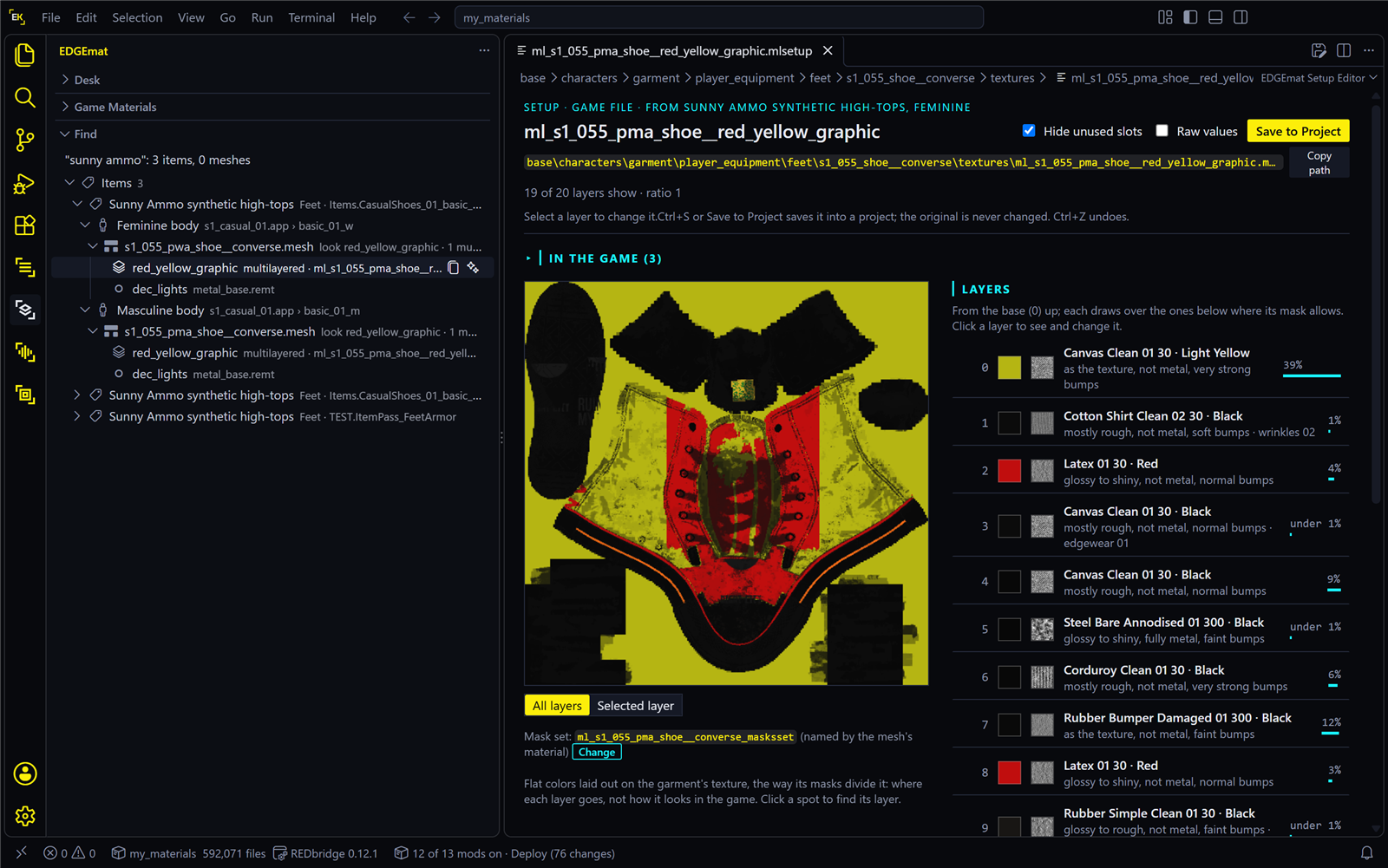
EDGEmat is the EDGE platform’s material editor for Cyberpunk 2077. It runs inside VS Code. Type a garment’s in-game name, such as “punk jeans”, and EDGEmat shows what it is made of: each layer in plain words (“leather, black, 6% of the jacket”), a map of where each layer sits, and the garment in 3D with its colors. Change a layer’s color, save the change into a mod project, and wear it in the game. You can also describe a new material in words and put it on the garment, or ask an AI assistant such as Claude to do any of this for you.
A mod project is a folder that holds your changes until they are packed into a mod. REDcode, EDGE’s editor for game files, makes one for you and packs it.
New here? Read this page, then Install and set up, then follow Tutorial: recolor a jacket. It takes about 20 minutes, with no coding and no paid key. If you would rather ask Claude to do it, Recolor a jacket with EDGEchat does the same job by chat.
| On this page | |
|---|---|
| What it’s for | How the game colors clothes, in four sentences |
| What it can do | The features, each with its page |
| Colors come from a list | The one surprise to know about |
| Words you’ll meet | Setup, surface, look, mask and the rest |
| Why you might want it | |
| How it fits into EDGE | What it needs from the other tools |
| Status | What works, what was tested, what comes next |
| In this section | Every page |
What it’s for
In Cyberpunk 2077, most clothing and many objects get their look from multilayered materials. A jacket isn’t one picture: it is a stack of up to 20 layers, such as leather, metal studs and stitching. Each layer has a surface (leather, denim, chrome), a color from that surface’s list, and a mask: a black-and-white image that says which part of the garment the layer covers. A small file, the setup (.mlsetup), holds the stack.
Recoloring a garment means editing that file. Until now that took specialist tools and some knowledge of how the layers fit together. EDGEmat’s aim is to make it a few clicks, or one sentence to an assistant.
What it can do
| You can | Where |
|---|---|
| Find a garment’s materials from its in-game name, down to the exact files, for each body type | Find |
| Read the layers in plain words: surface, color, shine, metal, bumps and how much of the garment each covers | The setup editor |
| See where each layer goes, on a color map you can click | The setup editor |
| Recolor a layer: its surface, color, finish and detail, with undo. Then save it into your mod project. It shows in the game without any helper mod installed | The setup editor |
| Keep work in progress on the Desk, a scratch area: garments with your edits, in several versions, kept across restarts until you add them to a project | The Desk |
| See the garment in 3D with each layer’s surface and color, in REDcode’s viewer, following your edits as you make them | View in 3D |
| Find out which in-game item wears the garment you changed, and get the command that puts it in V’s inventory, so you can see your change | Your mod in the game |
| Make a new material from words, through Google Gemini or OpenAI with your own key, or from a photo, and put it on part of a garment. Its bumps lie over the garment’s own folds and wrinkles | New Material |
| Dress a prop’s parts in the game’s own materials: a surface such as car paint in one of its colors, glass, a glow, or back to the model’s texture. For props EDGEfab makes, or any mesh in your project | The Desk |
| Browse every surface and detail pattern in your game, with every color as a named swatch | Game Materials, Surface pages |
| Open a material file from anywhere: the game, your project, a file on disk or another mod’s archive, also with a right-click | The setup editor |
| Work through an AI assistant: Claude can do each of these for you | Assistants |
Colors come from a list
A layer’s color isn’t a free choice. Each surface offers a fixed list of colors, from a handful to over a thousand. So “red” means the closest red that surface has. If none is close enough, you switch the layer to another surface with a better red.
EDGEmat is built around that. The color picker shows only the colors the layer’s surface has, a filter narrows them by words such as dark red, and each surface page sorts its colors by how close they are to one you name. Colors that no surface offers are planned for later.
Words you’ll meet
| Word | Means |
|---|---|
| Material | How one part of a garment looks: its colors, wear and shine. A garment has one or more |
| Multilayered material, or layered material | A material built from a stack of layers. Most clothing uses them, and they are the ones EDGEmat recolors |
| Layer | One coat in the stack: a surface, a color and a mask |
| Surface | One kind of stuff, such as a leather, a denim or a chrome: a grey texture plus the list of colors and finishes it can take. In the game’s files, an .mltemplate |
| Setup | The file that holds a material’s stack of layers, an .mlsetup. Recoloring changes a setup |
| Mask, mask set | A mask is a black-and-white image that says where one layer shows. A garment has one per layer. Together they are its mask set, an .mlmask |
| Microblend | A small detail pattern, such as wear, dirt, scratches or a print, that a layer can carry on top of its surface. These pages also call it a detail texture |
| Mesh | A garment’s 3D shape, a .mesh file. The mesh also names the materials it wears |
| Look | One set of materials for a mesh: the same jacket shape in black, or in red. The game’s files call it an appearance |
| Body type | V’s body, feminine or masculine. Many garments have a separate mesh for each, so a recolor has to reach both |
| Record id | The game’s internal name for an item, such as Items.Pants_01_basic_01. You use it to give the item to V |
| Project | Your mod project: a folder REDcode makes for your changes. It is the same kind of project WolvenKit uses, so these pages also say WolvenKit project |
| Pack | Turn a project into the one .archive file the game loads. REDcode does it |
| The Desk | EDGEmat’s scratch area for garments you are working on, before they go into a project |
More terms are in the wiki’s glossary.
Why you might want it
| If you… | EDGEmat gives you |
|---|---|
| Want to recolor a jacket but don’t know where to start | Type the jacket’s name. EDGEmat finds its files and lays out its layers in plain words |
| Use MlsetupBuilder or WolvenKit today | The same layers, read through WolvenKit’s own engine, with names in plain words. It also finds the files behind an item for you |
| Wonder which file a mod changed, or why a layer shows white | Open the mod’s archive. EDGEmat reads its setups and flags what looks wrong |
| Want Claude to do it for you | Tools to find, describe, recolor and make materials: “make the punk jeans dark green” |
| Want a look the game doesn’t have | Describe it (“dark green snakeskin”) and wear it in the game minutes later: Tutorial: worn leather |
How it fits into EDGE
| Part | Role for EDGEmat |
|---|---|
| REDbridge | Reads every game file, using WolvenKit’s engine. EDGEmat needs it. REDcode installs it |
| REDcode | Recommended. With it, EDGEmat takes the game folder and REDbridge from REDcode, so there is nothing to set up. EDGEmat saves into REDcode’s open project, REDcode packs it for the game, and REDcode’s 3D viewer shows EDGEmat’s colors |
| REDnode | Optional, in the game. Its Console gives V the item you changed, and it lets REDcode swap your mod into the running game |
| Claude and other assistants | EDGEmat’s MCP server lets an AI assistant find, describe, recolor and make materials. Whatever the buttons can do, an assistant can do too. EDGEchat connects it for you |
| EDGEkit | The EDGEkit app has EDGEmat built in. In VS Code, the EDGEkit extension pack installs it with the other EDGE tools |
EDGEmat builds its list of game materials from your own game the first time it runs. So it ships no game data, and it stays current after game patches. It makes no network calls of its own, except to an image service you chose, when you press Generate.
Status
A preview, released. The latest is EDGEmat 0.3.3 (2026-11-18), on the VS Code Marketplace, Open VSX, Nexus Mods and GitHub, with its MCP server on npm. Windows only.
| Works, and seen in the game | Recoloring a garment’s layers and saving them into a project, from Find and from the Desk. The command that gives V the item. New materials from words or a photo, on a garment, with their bumps raised over its folds. Game surfaces and game materials on a prop’s parts. Recolors and new materials made by asking Claude |
| Works, tested in VS Code | Game Materials, surface pages, Find, the color map and its zoom, View in 3D (each layer’s surface and color, marked approximate), opening setups from files and other mods |
| Newer tools for assistants | mat_parts, mat_materials, mat_restyle, mat_reshape and mat_from_model. Some were tested less than the rest: see Assistants |
| Not there yet | Shine, bumps and game lighting in the 3D preview. Colors no surface offers. Materials that are not layered. Items added by other mods, in Find |
| Coming next | Shine in the 3D preview, then glass and glow. More materials for brand-new clothes and objects, for EDGEfab, the asset maker. Wardrobe Designer, an in-game app that restyles what V wears, is built and was tested in the game, but is not released yet |
Each version’s changes are in EDGEmat’s changelog, and the plan is in its design.
In this section
| Page | What it covers |
|---|---|
| Install and set up | What you need, installing the preview, the first start |
| Tutorial: recolor a jacket | From a jacket’s name to a blue jacket on V. No key needed |
| Find | From a garment’s name to its materials, for each body type, and the two ways into a project |
| The Desk | Work in progress: your edits and variations, until they go into a project |
| The setup editor | A garment’s layers in plain words, the color map, changing layers and Save to Project |
| View in 3D | The garment on its mesh, with its colors, in REDcode’s viewer |
| Your mod in the game | Pack, install, and the item to give V to wear what you changed |
| New Material | A material from words or a photo, put on a garment |
| Tutorial: worn leather | Leather pants from one line of words, in the editor |
| Tutorial: snakeskin | Snakeskin pants by asking Claude |
| Game Materials | Every surface and detail pattern in your game |
| Surface pages | A surface’s colors as named swatches, and the closest color to one you name |
| Assistants | Let Claude find, describe, recolor and make materials for you |
| Settings and commands | Every setting, command and shortcut |
| Troubleshooting | What you see, and what to do |
Credits
EDGEmat learns from MlsetupBuilder by Neurolinked, the multilayered material editor many modders already know, and from WolvenKit and the Cyberpunk 2077 modding wiki. EDGEmat is a new editor written from scratch: it studied how MlsetupBuilder behaves, and uses none of its code or data. It is an EDGEmodders project, not made with or endorsed by MlsetupBuilder’s author, who has been contacted about it.
Reference
- EDGEmat docs: the design, the behavior spec, the changelog and the progress log
- Source and issues